
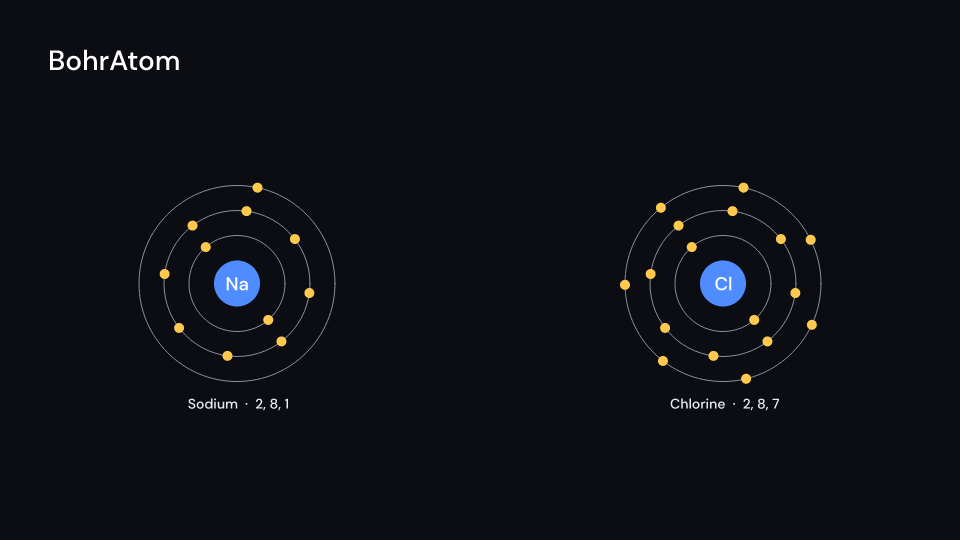
The Bohr model of an element: its symbol on the nucleus and its electrons on rings,
shell_gap pixels apart. The shells come from the ground state configuration, so copper is
2, 8, 18, 1. After delay the electrons appear one by one over fill seconds, innermost
shell first. Every shell turns, the outer ones slower (speed radians a second on the first).
With labels the name and the electrons per shell sit under the atom. Gallery scene:
BohrAtom (sodium and chlorine).
BohrAtom 5 suse fframes_kit::prelude::*;
fn figure<'a>(ui: &mut Ui<'a, '_, '_>) -> Svgr<'a> { ui.show(BohrAtom { element: 11, center: (-3.6, 0.0), shell_gap: 50.0, delay: 0.5, enter: Some(Create::default().into()), ..ui.defaults() })}Components are plain structs. Set the fields you need and fill the rest with ..ui.defaults(): the defaults below come from the current theme (theme. values are fields of Theme).
BohrAtom
Section titled “BohrAtom”| Field | Type | Default | Description |
|---|---|---|---|
element |
u32 |
11 |
Atomic number of the element drawn (11 is sodium). |
center |
(f64, f64) |
(0.0, 0.0) |
The middle of the nucleus, in units of ui.space. |
nucleus_radius |
f32 |
46.0 |
Radius in pixels of the nucleus disc that carries the symbol. |
shell_gap |
f32 |
56.0 |
Distance in pixels between neighbouring shell rings, and from the nucleus to the first. |
electron_radius |
f32 |
10.0 |
Radius in pixels of an electron dot. |
delay |
f32 |
0.0 |
Seconds after the container’s start before the electrons begin to appear. |
fill |
f32 |
1.5 |
Seconds the electrons take to appear one after another, innermost shell first. |
speed |
f32 |
1.2 |
Turning speed of the first shell in radians per second; outer shells turn slower. |
labels |
bool |
true |
Writes the element name and the electrons per shell under the atom; false for none. |
nucleus_color |
Color |
theme.colors.accent |
Colour of the nucleus disc. |
shell_color |
Color |
theme.colors.muted |
Colour of the shell rings. |
electron_color |
Color |
theme.colors.highlight |
Colour of the electron dots. |
text_color |
Color |
theme.colors.text |
Colour of the name and shell count label under the atom. |
stroke_width |
f32 |
theme.stroke.thin |
Outline width in pixels of the shell rings. |
enter |
Option<EnterAnim> |
None |
How the shell rings appear; None shows them from the start. |
exit |
Option<ExitAnim> |
None |
How the shell rings leave at the end of the container; None stays. |
parts_enter |
Option<FadeIn> |
None |
Fade in of the nucleus, electrons and labels; None for none. |
parts_exit |
Option<FadeOut> |
None |
Fade out of the nucleus, electrons and labels before the end; None for none. |
Methods:
fn shell_radius(&self, index: usize) -> f64: The radius in pixels of shellindex(0 innermost).fn electron_angle(&self, index: usize, slot: u32, count: u32, t: f64) -> f64: The angle in radians of electronslotof thecounton shellindex,tseconds afterdelay: evenly spaced, turning atspeed / (index + 1).
Feature chemistry · Source