
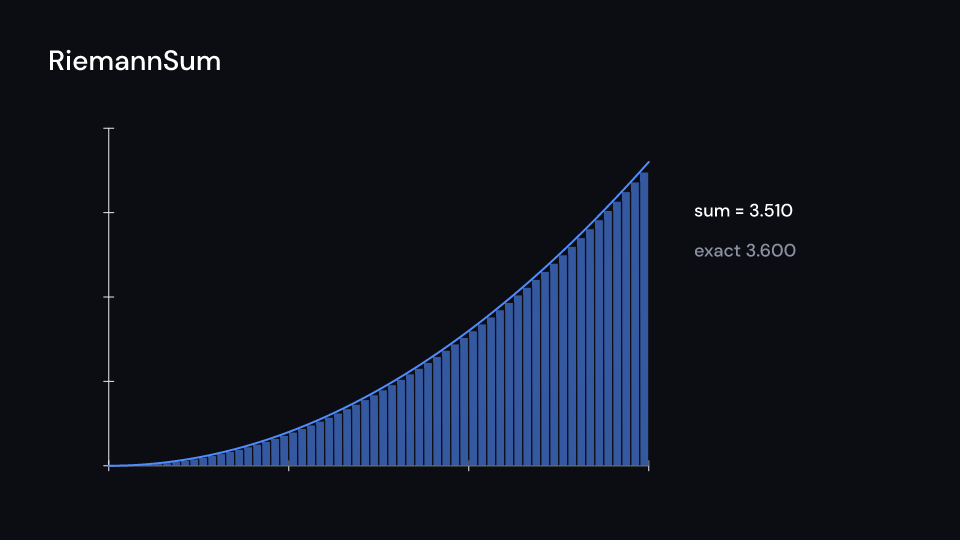
RiemannSum draws Riemann rectangles with each width of dxs in turn, cross-fading from
one to the next, and can write the sum. AreaUnder reveals the area under a graph from
left to right and writes the integral of the part shown so far. Build their rects and
area with axes.riemann_rectangles and axes.area. integral(f, g, a, b, n) is the
trapezoid rule they use. Gallery scenes: RiemannSum, AreaUnder, Area, RiemannRectangles.
RiemannSum 4.5 s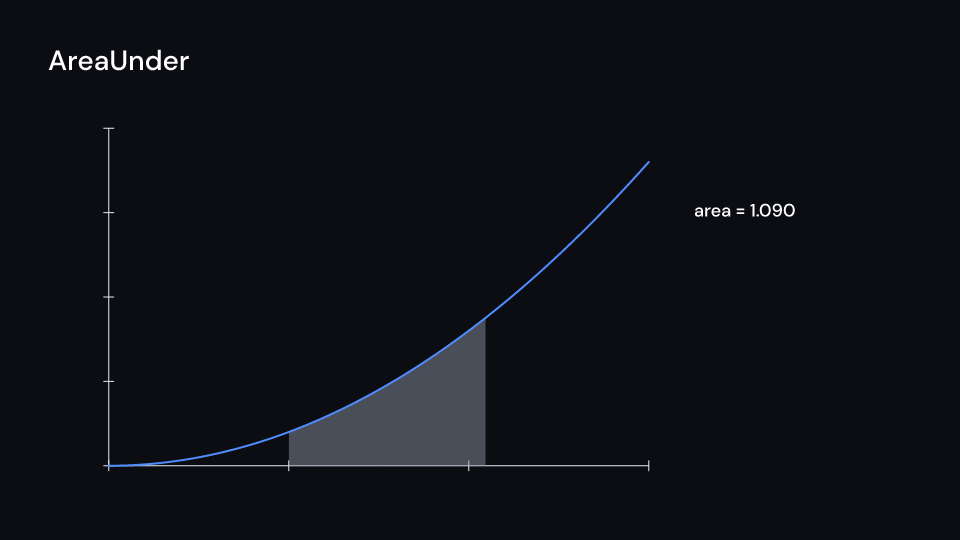
AreaUnder 3.5 s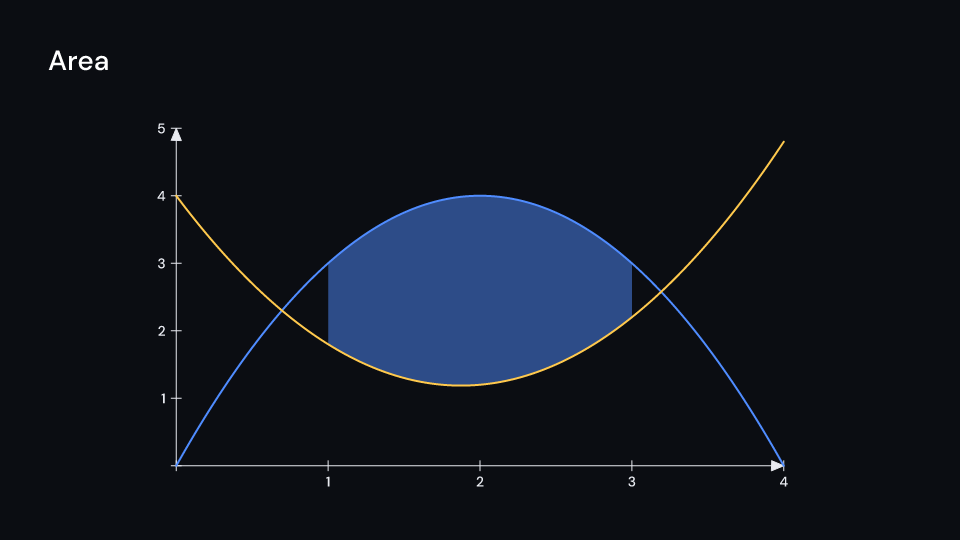
Area 3 s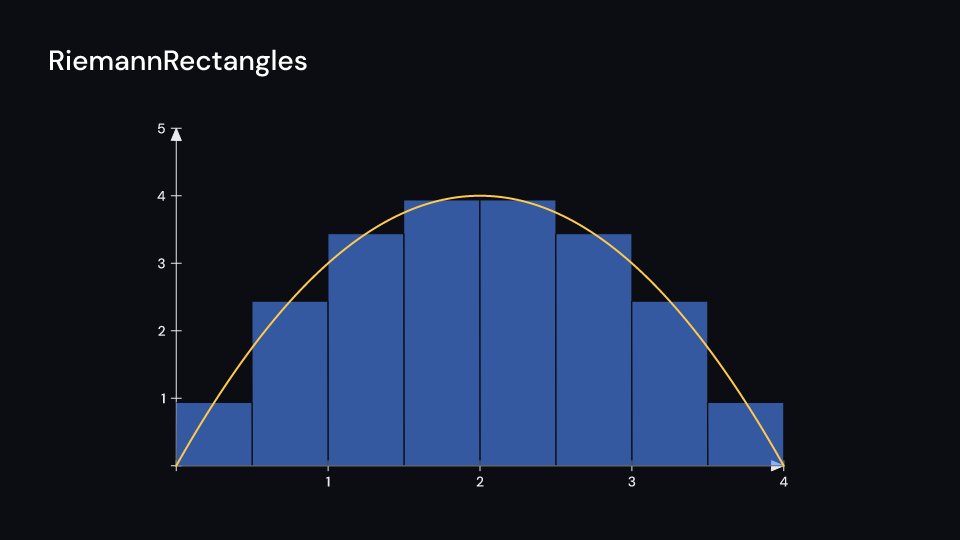
RiemannRectangles 3 suse fframes_kit::prelude::*;
fn figure<'a>(ui: &mut Ui<'a, '_, '_>) -> Svgr<'a> { let axes = Axes { x_range: Range::new(0.0, 3.0, 1.0), y_range: Range::new(0.0, 4.0, 1.0), ..ui.defaults() }; let f = |x: f64| 0.4 * x * x; let rects = RiemannRectangles { ..axes.riemann_rectangles(ui, f, (0.0, 2.0), 0.5) }; let region = Area { ..axes.area(ui, f, (2.0, 3.0)) }; let sum = ui.show(RiemannSum { rects, dxs: vec![0.5, 0.25, 0.1, 0.05], sum: Some(Label { text: "sum = ".into(), x: 1400.0, y: 300.0, ..ui.defaults() }), ..ui.defaults() }); let area = ui.show(AreaUnder { area: region, delay: 1.0, value: Some(Label { text: "area = ".into(), x: 1400.0, y: 360.0, ..ui.defaults() }), ..ui.defaults() }); let graph = ui.show(axes.plot(ui, f)); let axes = ui.show(axes); svgr!(<g>{axes}{sum}{area}{graph}</g>)}
// the integral of 0.4 x² from 0 to 3 is 0.4 * 27 / 3let area = fframes_kit::kits::math::integral(|x| 0.4 * x * x, None, 0.0, 3.0, 256);assert!((area - 3.6).abs() < 1e-3);Area and RiemannRectangles also draw directly, without the animated wrappers:
use fframes_kit::prelude::*;
fn figure<'a>(ui: &mut Ui<'a, '_, '_>) -> Svgr<'a> { let axes = Axes { x_range: Range::new(0.0, 3.0, 1.0), y_range: Range::new(0.0, 4.0, 1.0), ..ui.defaults() }; let f = |x: f64| 0.4 * x * x; let rects = ui.show(axes.riemann_rectangles(ui, f, (0.0, 2.0), 0.5)); let area = ui.show(axes.area(ui, f, (2.0, 3.0))); let graph = ui.show(axes.plot(ui, f)); let axes = ui.show(axes); svgr!(<g>{axes}{rects}{area}{graph}</g>)}Components are plain structs. Set the fields you need and fill the rest with ..ui.defaults(): the defaults below come from the current theme (theme. values are fields of Theme).
RiemannSum
Section titled “RiemannSum”Riemann rectangles that get finer: rects is drawn with each width of dxs in turn, hold seconds each, cross-fading to the next over crossfade seconds, from delay. sum writes the Riemann sum after its text with decimals, fading with the rectangles. Build rects with Axes::riemann_rectangles.
| Field | Type | Default | Description |
|---|---|---|---|
rects |
RiemannRectangles |
RiemannRectangles::themed(theme) |
The rectangles, built with Axes::riemann_rectangles; their width is replaced by each of dxs in turn. |
dxs |
Vec<f64> |
vec![0.5, 0.25, 0.1] |
Rectangle widths, in the x units of the axes, shown one after the other (finer each time). |
delay |
f32 |
0.0 |
Seconds after the container’s start before the first set of rectangles appears. |
hold |
f32 |
1.0 |
Seconds each set of rectangles stays before the next begins to replace it. |
crossfade |
f32 |
theme.motion.duration.base |
Seconds one set takes to fade into the next. |
sum |
Option<Label> |
None |
Text written beside the rectangles followed by the Riemann sum; None for no number. |
decimals |
usize |
3 |
Digits after the decimal point of the sum. |
Feature math · Source
AreaUnder
Section titled “AreaUnder”The area under a graph revealed from left to right over run_time seconds after delay (Manim’s get_area with a growing x_range), with the integral of the part shown so far written after the text of value. Build area with Axes::area; key tells the clip paths of two areas in one frame apart.
| Field | Type | Default | Description |
|---|---|---|---|
area |
Area |
Area::themed(theme) |
The region to reveal, built with Axes::area: the graph, its axes and the x_range it covers. |
delay |
f32 |
0.0 |
Seconds after the container’s start before the area starts to grow. |
run_time |
f32 |
1.5 |
Seconds the area takes to grow across its x_range. |
rate_func |
RateFunc |
RateFunc::default() |
Easing of the growth over its run time. |
value |
Option<Label> |
None |
Text written beside the area followed by the integral of the part shown so far; None for no number. |
decimals |
usize |
3 |
Digits after the decimal point of the integral. |
key |
Option<&str> |
None |
Names the clip path when two areas share a frame; None for the default. |
Feature math · Source
The region between f and bounded (the x-axis when None) from x_range.0 to x_range.1 (Manim get_area(graph, x_range, bounded_graph)).
| Field | Type | Default | Description |
|---|---|---|---|
f |
Func |
|x| x |
The upper function of the region, in data units; a plain fn. |
bounded |
Option<Func> |
None |
The function that bounds the region below; None bounds it with the x-axis. |
x_range |
(f64, f64) |
(0.0, 1.0) |
The first and last x the region covers, in data units. |
axes |
AxesMap |
AxesMap::default() |
The mapping of the axes the region sits on (axes.map(ui)). |
samples |
usize |
128 |
Number of straight pieces the region’s edges are sampled with. |
fill |
Option<Color> |
paint.fill |
None leaves the inside empty. |
stroke |
Option<Color> |
paint.stroke |
None draws no outline. |
stroke_width |
f32 |
paint.stroke_width |
Outline width in pixels. |
dash |
Option<(f32, f32)> |
None |
Dash and gap lengths of the outline. |
opacity |
f32 |
1.0 |
0 transparent to 1 opaque. |
enter |
Option<EnterAnim> |
None |
How it appears; None shows it from the start. |
exit |
Option<ExitAnim> |
None |
How it leaves at the end of its container; None stays. |
emphasis |
Option<Emphasis> |
None |
An emphasis animation (Indicate, Wiggle, ..) played while it is shown. |
Methods:
fn shape(&self) -> Shape: The path and paint as aShape.
RiemannRectangles
Section titled “RiemannRectangles”Rectangles of width dx from x_range.0 to x_range.1, each as high as f at its left edge, center or right edge (Manim get_riemann_rectangles). Below the x-axis for negative values.
| Field | Type | Default | Description |
|---|---|---|---|
f |
Func |
|x| x |
The function whose value at the left edge, center or right edge gives each rectangle’s height, in data units. |
x_range |
(f64, f64) |
(0.0, 1.0) |
The first and last x the rectangles cover, in data units. |
dx |
f64 |
0.1 |
Width of each rectangle in data units. |
sample_at |
SampleAt |
SampleAt::Left |
Where f is read for a rectangle’s height: its left edge, center or right edge. |
axes |
AxesMap |
AxesMap::default() |
The mapping of the axes the rectangles stand on (axes.map(ui)). |
fill |
Option<Color> |
paint.fill |
None leaves the inside empty. |
stroke |
Option<Color> |
paint.stroke |
None draws no outline. |
stroke_width |
f32 |
paint.stroke_width |
Outline width in pixels. |
dash |
Option<(f32, f32)> |
None |
Dash and gap lengths of the outline. |
opacity |
f32 |
1.0 |
0 transparent to 1 opaque. |
enter |
Option<EnterAnim> |
None |
How it appears; None shows it from the start. |
exit |
Option<ExitAnim> |
None |
How it leaves at the end of its container; None stays. |
emphasis |
Option<Emphasis> |
None |
An emphasis animation (Indicate, Wiggle, ..) played while it is shown. |
Methods:
fn shape(&self) -> Shape: The path and paint as aShape.fn sum(&self) -> f64: The Riemann sum: the signed area of the rectangles, in data units.