
Molecule3D and Orbital
Cargo featurefeatures = ["chemistry"]
These two need the 3d feature as well (features = ["chemistry", "3d"]), which turns on
fframes/3d. They render a 3D scene with fframes::three_d on every frame, on the CPU or,
with the wgpu features, on the GPU, and place it as an image of width x height pixels
around center. The scene uses right-handed chemistry axes with z up; seen from azimuth
0, x points to the right and y into the image. The gallery’s eleven seconds of 3D scenes render on the CPU in about seven seconds on 32
threads. The gallery leaves them out of the editor bridge.
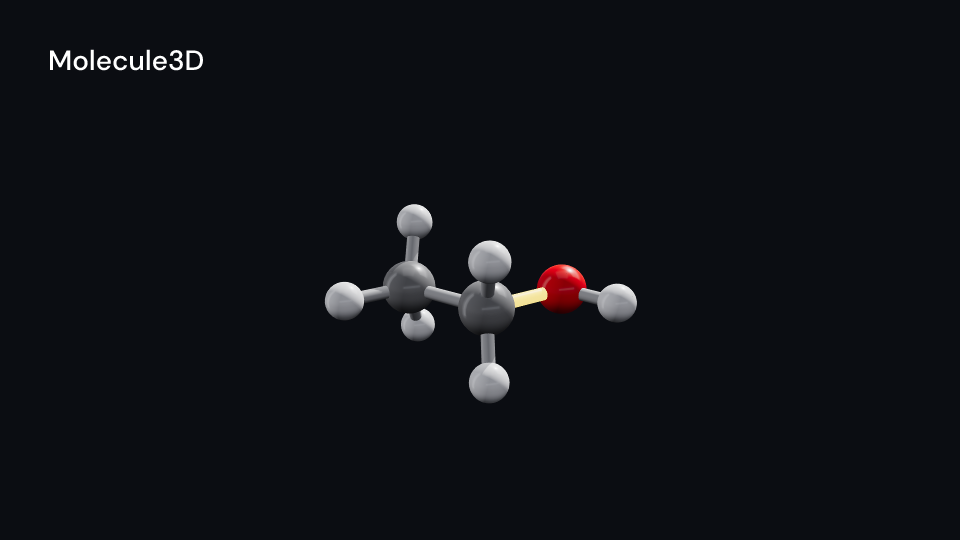
Molecule3D draws a Structure3D as balls and sticks in CPK colours. Structure3D::from_xyz
reads an XYZ file (the number of atoms, a comment line, then symbol x y z in ångström) and
finds single bonds between atoms closer than 1.2 times the sum of their covalent radii. It
returns an XyzError for a broken file. Set bonds yourself ((from, to, order)) for double
and triple bonds, which draw as two or three thinner sticks. The camera fits the whole
molecule and turns spin degrees a second around the vertical axis. The bonds listed in
highlight (indices into bonds) turn highlight_color and glow over half a second from
highlight_at. Gallery scene: Molecule3D (ethanol, its C-O bond lighting up).
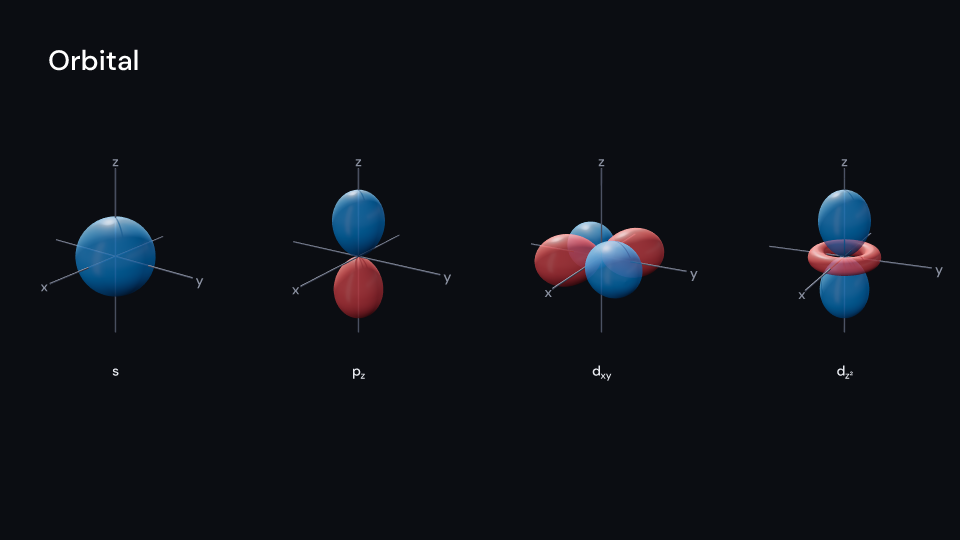
Molecule3D 6 sOrbital draws an OrbitalKind: S, Px, Py, Pz, Dxy, Dxz, Dyz, Dx2y2 or Dz2.
The lobes are the polar plot of size · cos²θ, positive and negative for the sign of the
wave function, and d_z² has its ring of opposite sign. OrbitalKind::lobes lists the
directions and signs. The lobes grow and fade in over grow seconds from delay, then the
view turns. axes draws and labels x, y and z, and label names the orbital under the
image with its subscript. Gallery scene: Orbital (s, p_z, d_xy and d_z²).
Orbital 5 suse fframes_kit::prelude::*;
let water = { let water = Structure3D::from_xyz( "3\nwater\nO 0 0 0.117\nH 0 0.757 -0.469\nH 0 -0.757 -0.469\n", ) .expect("a valid XYZ file"); // two O-H bonds, the hydrogens too far apart for a third assert_eq!(water.bonds, vec![(0, 1, 1), (0, 2, 1)]); water};
fn figures<'a>(ui: &mut Ui<'a, '_, '_>, water: &'a Structure3D) -> Svgr<'a> { let molecule = ui.show(Molecule3D { structure: Some(water), center: (-3.0, 0.0), width: 600.0, height: 600.0, highlight: vec![0], highlight_at: 1.0, ..ui.defaults() }); let orbital = ui.show(Orbital { kind: OrbitalKind::Dz2, center: (3.0, 0.0), delay: 0.5, ..ui.defaults() }); svgr!(<g>{molecule}{orbital}</g>)}Components are plain structs. Set the fields you need and fill the rest with ..ui.defaults(): the defaults below come from the current theme (theme. values are fields of Theme).
Molecule3D
Section titled “Molecule3D”A Structure3D as balls and sticks in CPK colours, rendered in 3D into a width x height pixel image around center (units of ui.space). The molecule turns spin degrees a second around the vertical axis, seen from elevation degrees above. The bonds listed in highlight (indices into bonds) turn highlight_color and glow over half a second from highlight_at. The image fades with enter and exit.
| Field | Type | Default | Description |
|---|---|---|---|
structure |
Option<&Structure3D> |
None |
The atoms and bonds to draw, in ångström; None draws nothing. |
center |
(f64, f64) |
(0.0, 0.0) |
The middle of the image, in units of ui.space. |
width |
f32 |
900.0 |
Width in pixels of the rendered image. |
height |
f32 |
640.0 |
Height in pixels of the rendered image. |
spin |
f32 |
30.0 |
Degrees per second the molecule turns around the vertical axis; 0 holds it still. |
azimuth |
f32 |
0.0 |
Degrees the view starts turned around the vertical axis, before spin adds to it. |
elevation |
f32 |
20.0 |
Degrees the view looks down from above the molecule; 0 is level with it. |
highlight |
Vec<usize> |
Vec::new() |
Indices into the structure’s bonds that turn highlight_color and glow; empty for none. |
highlight_at |
f32 |
0.0 |
Seconds after the container’s start when the highlight begins (it takes half a second). |
bond_color |
Color |
Color::hex("#bfbfbf") |
Colour of the bond sticks. |
highlight_color |
Color |
theme.colors.highlight |
Colour the highlighted bonds turn to and glow in. |
enter |
Option<FadeIn> |
None |
Fade in at the start; None for none. |
exit |
Option<FadeOut> |
None |
Fade out before the end; None for none. |
Feature chemistry · Source
Orbital
Section titled “Orbital”An atomic orbital in 3D, rendered into a width x height pixel image around center (units of ui.space): lobes of size (scene units, the axes reach 1.3 times as far) in positive and negative for the sign of the wave function, d_z² with its ring. The lobes grow and fade in over grow seconds from delay, then the view turns spin degrees a second seen from elevation degrees above. axes draws and labels x, y and z, and label names the orbital under the image.
| Field | Type | Default | Description |
|---|---|---|---|
kind |
OrbitalKind |
OrbitalKind::default() |
Which orbital: the s, p or d shape drawn. |
center |
(f64, f64) |
(0.0, 0.0) |
The middle of the image, in units of ui.space. |
width |
f32 |
420.0 |
Width in pixels of the rendered image. |
height |
f32 |
420.0 |
Height in pixels of the rendered image. |
size |
f32 |
1.0 |
Length of a lobe in scene units; the axes reach 1.3 times as far. |
positive |
Color |
Color::hex("#4dabf7") |
Colour of the lobes where the wave function is positive. |
negative |
Color |
Color::hex("#ff6b6b") |
Colour of the lobes where the wave function is negative. |
opacity |
f32 |
0.85 |
0 transparent to 1 opaque, of the lobes once grown. |
delay |
f32 |
0.0 |
Seconds after the container’s start before the lobes begin to grow and the view begins to turn. |
grow |
f32 |
1.0 |
Seconds the lobes take to grow and fade in. |
spin |
f32 |
20.0 |
Degrees per second the view turns around the vertical axis once delay has passed; 0 holds it still. |
azimuth |
f32 |
30.0 |
Degrees the view starts turned around the vertical axis, before spin adds to it. |
elevation |
f32 |
20.0 |
Degrees the view looks down from above the orbital; 0 is level with it. |
axes |
bool |
true |
Draws and labels the x, y and z axes; false for none. |
axis_color |
Color |
theme.colors.muted |
Colour of the axes and their letters. |
label |
bool |
true |
Writes the orbital’s name under the image; false for none. |
label_color |
Color |
theme.colors.text |
Colour of the name under the image. |
enter |
Option<FadeIn> |
None |
Fade in at the start; None for none. |
exit |
Option<FadeOut> |
None |
Fade out before the end; None for none. |
Feature chemistry · Source