
TitrationCurve and PhScale
Cargo featurefeatures = ["chemistry"]
Titration is an acid titrated with sodium hydroxide: the acid’s concentration and volume,
the base’s concentration, and a pka for a weak acid (Titration::weak) or none for a strong
one (Titration::strong). ph(added) solves the charge balance exactly, so the start, the
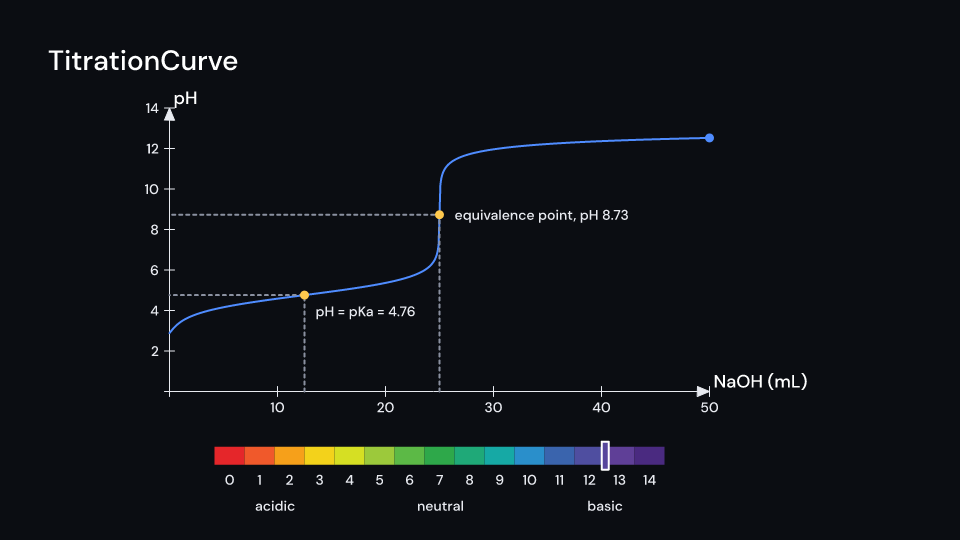
buffer region and the equivalence point all come out right: 25 mL of 0.1 M acetic acid starts
at pH 2.88, is at 4.76 at half equivalence and at 8.72 at equivalence. equivalence() gives
the base needed and curve(until, steps) the points.
TitrationCurve draws the curve on the axes of an Axes you show yourself (mL across, pH
up). From delay the base pours in at a constant rate up to until mL over run_time
seconds, with a dot at the current pH. As the pour passes them, the equivalence point is marked
with guides to both axes and its pH. For a weak acid, the half-equivalence point is marked too,
where the pH equals the pKa. ph_at(seconds) gives the pH at a time, for a readout or a
PhScale pointer.
PhScale is the scale as 15 cells in the colours of universal indicator (indicator_color
blends them), with the values and “acidic”, “neutral” and “basic” under it. Each of markers,
a name and a pH, points at its place from above. They appear stagger seconds apart after
delay, in two rows. A pointer marks a pH on the bar. Gallery scenes: TitrationCurve
(acetic acid, with a scale following the pH) and PhScale (everyday substances).
TitrationCurve 6 s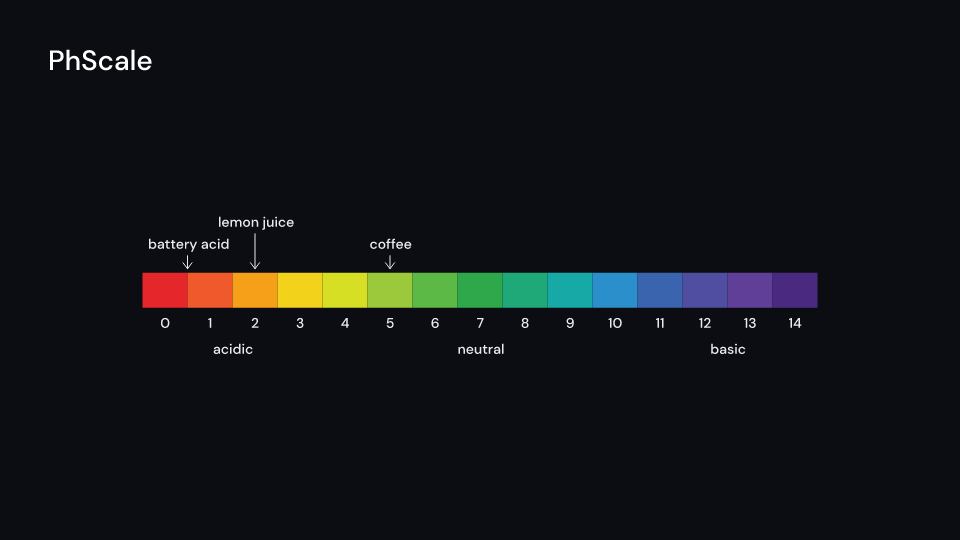
PhScale 3.5 suse fframes_kit::prelude::*;
let acetic = Titration::weak(0.1, 25.0, 0.1, 4.76);assert_eq!(acetic.equivalence(), 25.0);assert!((acetic.ph(12.5) - 4.76).abs() < 0.01);
fn figure<'a>(ui: &mut Ui<'a, '_, '_>) -> Svgr<'a> { let axes = Axes { x_range: Range::new(0.0, 50.0, 10.0), y_range: Range::new(0.0, 14.0, 2.0), x_length: 8.0, y_length: 4.2, y_label: Some("pH".into()), ..ui.defaults() }; let curve = TitrationCurve { titration: Titration::strong(0.1, 25.0, 0.1), axes: Some(axes.map(ui)), delay: 0.5, ..ui.defaults() }; let ph = curve.ph_at(ui.seconds()); let curve = ui.show(curve); let axes = ui.show(axes); let scale = ui.show(PhScale { center: (0.0, -3.0), width: 900.0, height: 36.0, pointer: Some(ph), ..ui.defaults() }); svgr!(<g>{axes}{curve}{scale}</g>)}Components are plain structs. Set the fields you need and fill the rest with ..ui.defaults(): the defaults below come from the current theme (theme. values are fields of Theme).
TitrationCurve
Section titled “TitrationCurve”The pH of a Titration as the base is added on axes (mL across, pH up): from delay over run_time seconds the base pours in at a constant rate up to until mL and the curve draws along with a dot at the current pH. When it gets there the equivalence point is marked with guides to both axes; for a weak acid the half-equivalence point too, where the pH equals the pKa. Show the axes yourself. Everything fades with parts_enter.
| Field | Type | Default | Description |
|---|---|---|---|
titration |
Titration |
Titration::default() |
The acid and base being titrated, whose pH the curve follows. |
axes |
Option<AxesMap> |
None |
The axes to draw on, mL across and pH up (c2p maps data to the canvas); None draws nothing. |
until |
f64 |
50.0 |
Millilitres of base added when the pour ends, the right end of the curve. |
delay |
f32 |
0.0 |
Seconds after the container’s start before the base begins to pour. |
run_time |
f32 |
4.0 |
Seconds the pour takes, at a constant rate, from none to until mL. |
labels |
bool |
true |
Names the equivalence point (and the half-equivalence point of a weak acid) when the curve reaches it; false for none. |
color |
Color |
theme.colors.accent |
Colour of the curve and its moving dot. |
marker_color |
Color |
theme.colors.highlight |
Colour of the dots on the marked points. |
guide_color |
Color |
theme.colors.muted |
Colour of the dashed guides from a marked point to both axes. |
text_color |
Color |
theme.colors.text |
Colour of the labels. |
stroke_width |
f32 |
theme.stroke.regular |
Width in pixels of the curve and the guides. |
parts_enter |
Option<FadeIn> |
None |
Fade in of the curve and its marks; None for none. |
parts_exit |
Option<FadeOut> |
None |
Fade out of the curve and its marks before the end; None for none. |
Methods:
fn added_at(&self, seconds: f32) -> f64: The base added byseconds, in mL.fn ph_at(&self, seconds: f32) -> f64: The pH atseconds, for aPhScalepointer or a readout.
Feature chemistry · Source
PhScale
Section titled “PhScale”The pH scale as a bar of 15 cells in the colours of universal indicator, width by height pixels around center (units of ui.space). With labels the values sit under the cells and “acidic”, “neutral” and “basic” under them. Each of markers (a name and its pH) points at its place above the bar; after delay they appear stagger seconds apart, in two rows so neighbours do not collide. A pointer marks a pH on the bar, for a value that changes. The cells draw with enter, the rest fades with parts_enter.
| Field | Type | Default | Description |
|---|---|---|---|
center |
(f64, f64) |
(0.0, 0.0) |
The middle of the bar, in units of ui.space. |
width |
f32 |
1350.0 |
Width of the bar in pixels, shared equally between the 15 cells. |
height |
f32 |
70.0 |
Height of the bar in pixels. |
markers |
Vec<(Cow<str>, f64)> |
Vec::new() |
Names and their pH, each pointing at its place above the bar; empty for none. |
pointer |
Option<f64> |
None |
A pH to point at on the bar, for a value that changes; None for no pointer. |
delay |
f32 |
0.0 |
Seconds after the container’s start before the first marker appears. |
stagger |
f32 |
0.4 |
Seconds between one marker appearing and the next. |
labels |
bool |
true |
Writes the pH values under the cells and “acidic”, “neutral” and “basic” under them; false for none. |
text_color |
Color |
theme.colors.text |
Colour of the labels and marker names. |
pointer_color |
Color |
theme.colors.title |
Colour of the pointer. |
enter |
Option<EnterAnim> |
None |
How the cells draw; None shows them from the start. |
exit |
Option<ExitAnim> |
None |
How the cells leave at the end of the container; None stays. |
parts_enter |
Option<FadeIn> |
None |
Fade in of the labels, markers and pointer; None for none. |
parts_exit |
Option<FadeOut> |
None |
Fade out of the labels, markers and pointer before the end; None for none. |
Methods:
fn point(&self, ui: &Ui, ph: f64) -> Point: The pixel on the middle line of the bar atph, the whole values at the cells’ middles.
Feature chemistry · Source