
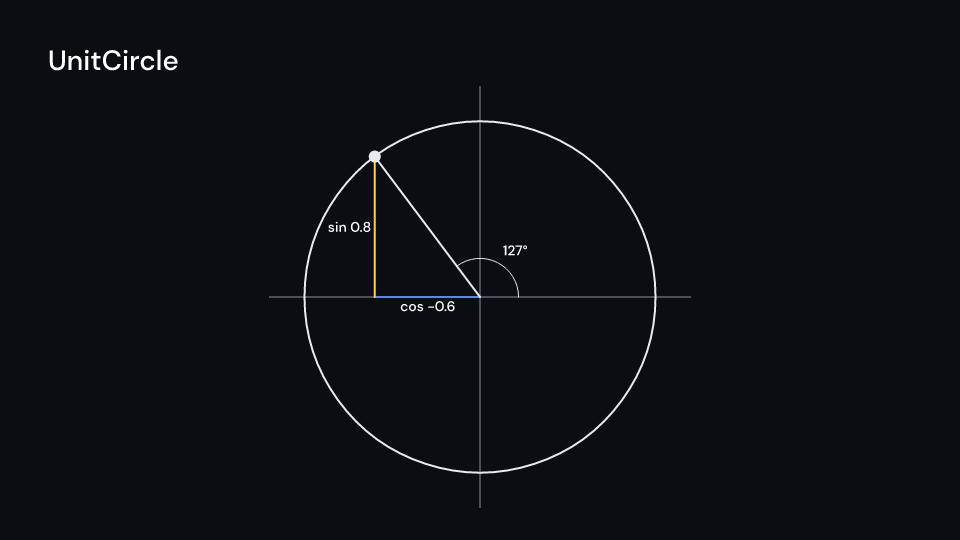
The unit circle at a tracked angle (radians, counterclockwise): the radius to the point,
the cosine along the x-axis, the sine up to the point and the angle’s arc. With labels
it writes cos 0.71, sin 0.71 and the angle in degrees. The circle and its axes draw
with enter, the moving parts fade in with parts_enter. Gallery scene: UnitCircle.
UnitCircle 4.5 suse fframes::animation::KeyFramesAnimation;use fframes_kit::prelude::*;
fn figure<'a>(ui: &mut Ui<'a, '_, '_>, angle: &'a KeyFramesAnimation<f32>) -> Svgr<'a> { ui.show(UnitCircle { center: (0.0, -0.4), radius: 2.6, angle: angle.into(), ..ui.defaults() })}Components are plain structs. Set the fields you need and fill the rest with ..ui.defaults(): the defaults below come from the current theme (theme. values are fields of Theme).
UnitCircle
Section titled “UnitCircle”| Field | Type | Default | Description |
|---|---|---|---|
center |
(f64, f64) |
(0.0, 0.0) |
The middle of the circle, in units of ui.space (y up). |
radius |
f64 |
3.0 |
Radius of the circle, in units of ui.space. |
angle |
ValueTracker |
0.0.into() |
The angle in radians, counterclockwise from the positive x-axis; a tracker to animate. |
labels |
bool |
true |
Writes the cosine, the sine and the angle in degrees when true. |
color |
Color |
theme.colors.text |
Colour of the circle, its axes, the radius and the arc. |
cos_color |
Color |
theme.colors.accent |
Colour of the cosine segment along the x-axis. |
sin_color |
Color |
theme.colors.highlight |
Colour of the sine segment up to the point. |
stroke_width |
f32 |
theme.stroke.regular |
Line width in pixels. |
enter |
Option<EnterAnim> |
None |
How the circle and its axes appear; None shows them from the start. |
exit |
Option<ExitAnim> |
None |
How the circle and its axes leave at the end of its container; None stays. |
parts_enter |
Option<FadeIn> |
None |
Fade in of the radius, cosine, sine, arc and labels; None for none. |
parts_exit |
Option<FadeOut> |
None |
Fade out of the radius, cosine, sine, arc and labels; None for none. |
Feature math · Source