
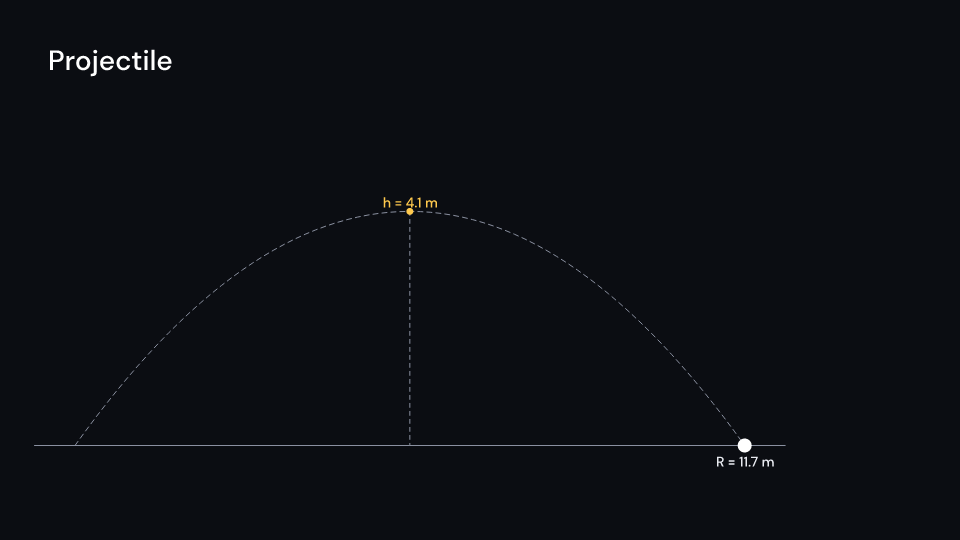
A ball thrown at speed and angle without drag. Its path draws behind it, and it
carries its velocity and the velocity’s two components. Once it passes them, the top of the
arc and the landing point are marked with the height and the range. flight_time,
position, velocity, apex and range give the numbers. Gallery scene: Projectile.
Projectile 3.5 suse fframes_kit::prelude::*;
fn figure<'a>(ui: &mut Ui<'a, '_, '_>) -> Svgr<'a> { ui.show(Projectile { origin: (-6.0, -2.5), speed: 11.0, angle: 0.9, scale: 0.9, delay: 0.5, enter: Some(Create::default().into()), ..ui.defaults() })}Components are plain structs. Set the fields you need and fill the rest with ..ui.defaults(): the defaults below come from the current theme (theme. values are fields of Theme).
Projectile
Section titled “Projectile”| Field | Type | Default | Description |
|---|---|---|---|
origin |
(f64, f64) |
(-6.0, -2.5) |
Where the ball is launched from, in units of ui.space. |
speed |
f64 |
10.0 |
Launch speed in m/s. |
angle |
f64 |
std::f64::consts::FRAC_PI_4 |
Launch angle above the horizontal in radians. |
gravity |
f64 |
GRAVITY |
Downward acceleration in m/s²; 0 or less gives no flight. |
scale |
f64 |
1.0 |
Units of ui.space per meter. |
delay |
f32 |
0.0 |
Seconds after the local start before the ball is launched. |
time_scale |
f32 |
1.0 |
Speed of the flight over local time; 2 runs twice as fast, 1 is real time. |
trace |
bool |
true |
Draws the path flown so far as a dashed line behind the ball. |
vectors |
bool |
true |
Draws the ball’s velocity and its horizontal and vertical components as arrows until it lands. |
peak |
bool |
true |
Marks the top of the arc with a dot and a dashed drop line once the ball has passed it. |
labels |
bool |
true |
Writes the height of the top and the range at the landing point (with peak). |
vector_scale |
f64 |
0.12 |
Units of ui.space per m/s for the velocity arrows. |
radius |
f32 |
14.0 |
Radius of the ball in pixels. |
color |
Color |
theme.colors.title |
Colour of the ball. |
velocity_color |
Color |
theme.colors.accent |
Colour of the velocity arrow. |
component_color |
Color |
theme.colors.highlight |
Colour of the horizontal and vertical component arrows and the marks. |
trace_color |
Color |
theme.colors.muted |
Colour of the dashed path. |
ground_color |
Color |
theme.colors.muted |
Colour of the ground line and the dashed drop line. |
stroke_width |
f32 |
theme.stroke.regular |
Width of the velocity arrow in pixels; the other arrows and lines use the theme’s thin width. |
enter |
Option<EnterAnim> |
None |
How the ground draws in; None shows it from the start. |
exit |
Option<ExitAnim> |
None |
How the ground leaves at the end of the container; None stays. |
parts_enter |
Option<FadeIn> |
None |
How the ball, path, arrows and labels fade in; None for none. |
parts_exit |
Option<FadeOut> |
None |
How the ball, path, arrows and labels fade out before the end; None for none. |
Methods:
fn flight_time(&self) -> f64: Seconds from the launch until the ball is back at the launch height; 0 when it is not thrown upward or there is no gravity.fn position(&self, t: f64) -> (f64, f64): Meters from the launch point aftertseconds of flight (yup), stopping at the landing.fn velocity(&self, t: f64) -> (f64, f64): Velocity in m/s aftertseconds of flight.fn apex(&self) -> (f64, f64, f64): The time, horizontal distance and height of the top of the arc.fn range(&self) -> f64: Meters from the launch point to the landing point.
Feature physics · Source