
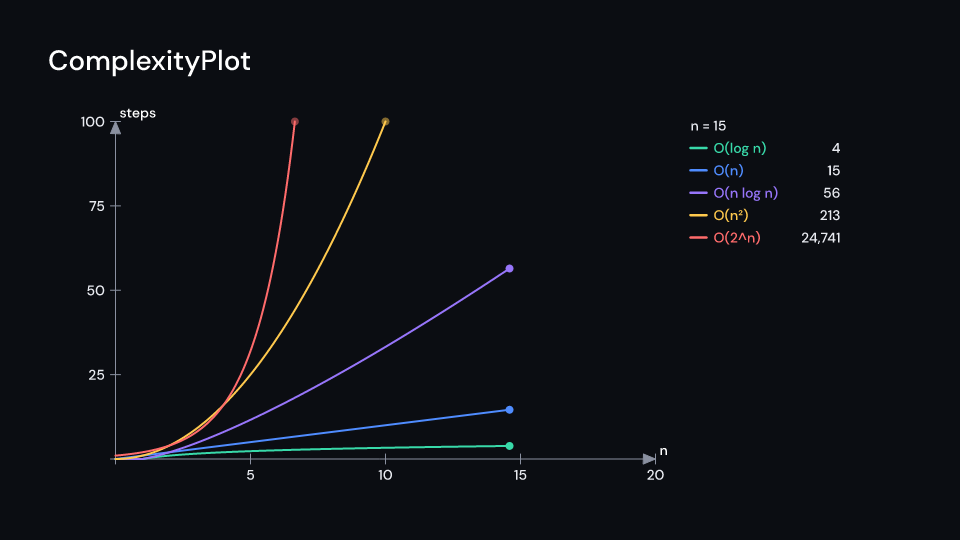
ComplexityPlot races growth rates on the same axes. n sweeps along n_range in
duration seconds from delay, and each Growth in growths grows with it, a dot at its
head; a curve that leaves the top of steps stops there. A legend beside the axes shows
n and each rate in its colour with its steps at that n (1,048,576). The rates are
Constant, Log, Linear, NLogN, Quadratic, Cubic, Exponential and Factorial
(logarithms base 2); Growth::eval(n) gives the steps, label() the notation (O(n log n)).
palette has one colour per rate, slowest first, so a rate keeps its colour in every plot.
Gallery scene: ComplexityPlot.
ComplexityPlot 7 suse fframes_kit::prelude::*;
assert_eq!(Growth::Quadratic.eval(12.0), 144.0);assert_eq!(Growth::Exponential.label(), "O(2^n)");
fn race<'a>(ui: &mut Ui<'a, '_, '_>) -> Svgr<'a> { ui.show(ComplexityPlot { growths: vec![Growth::Linear, Growth::NLogN, Growth::Quadratic], delay: 0.5, duration: 4.0, steps: Range::new(0.0, 200.0, 50.0), ..ui.defaults() })}Components are plain structs. Set the fields you need and fill the rest with ..ui.defaults(): the defaults below come from the current theme (theme. values are fields of Theme).
ComplexityPlot
Section titled “ComplexityPlot”| Field | Type | Default | Description |
|---|---|---|---|
growths |
Vec<Growth> |
— | The growth rates to race, slowest first; each gets the palette colour of its position. |
delay |
f32 |
0.0 |
Seconds after the container’s start before n begins to sweep. |
duration |
f32 |
4.0 |
Seconds n takes to sweep from the start of n_range to its end. |
center |
(f64, f64) |
(-1.2, 0.0) |
The middle of the axes, in units of ui.space. |
x_length |
f64 |
8.0 |
Width of the x axis, in units of ui.space. |
y_length |
f64 |
5.0 |
Height of the y axis, in units of ui.space. |
n_range |
Range |
Range::new(0.0, 20.0, 5.0) |
The input size n along the x axis: minimum, maximum and tick step. |
steps |
Range |
Range::new(0.0, 100.0, 25.0) |
The number of steps along the y axis: minimum, maximum and tick step; a curve that passes the maximum stops at the top. |
legend |
bool |
true |
Whether each rate is listed beside the axes with its steps at the current n. |
palette |
[Color; 8] |
— | One colour per curve, used in the order of growths. |
axis_color |
Color |
theme.colors.muted |
Colour of the axes and their ticks. |
label_style |
TextStyle |
label_style |
The font of the axis labels and the rate names in the legend. |
value_style |
TextStyle |
theme.typography.caption |
The font of the step counts in the legend. |
text_color |
Color |
theme.colors.text |
Colour of the legend text. |
enter |
Option<FadeIn> |
None |
Fade in at the start; None for none. |
exit |
Option<FadeOut> |
None |
Fade out before the end; None for none. |
Methods:
fn n_at(&self, seconds: f32) -> f64:natsecondsinto the race.
Feature cs · Source