
ElectricField and MagneticField
Cargo featurefeatures = ["physics"]
ElectricField is manim-physics’ ElectricField: an arrow on every grid point of
x_range by y_range, pointing along the field of charges and coloured by its strength
(colors from min_magnitude to max_magnitude), with each charge as a glowing
ChargeGlow. lines_per_charge adds the field lines of Field. charges is a plain prop:
compute it from ui.seconds() and the arrows and lines follow, the lines traced again each
frame. ChargeGlow { charge, .. } draws one charge on its own. Gallery scenes:
ElectricField, ChargeGlow.
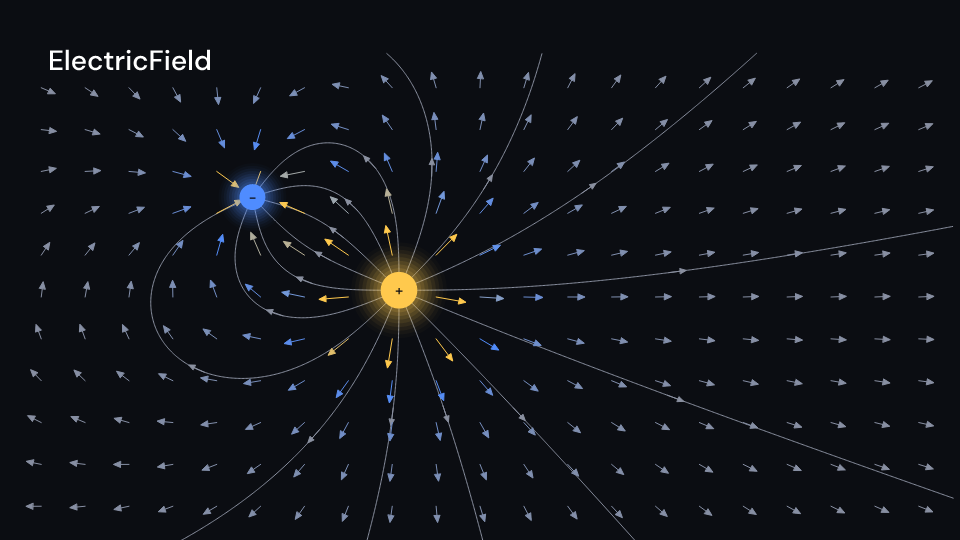
ElectricField 4 s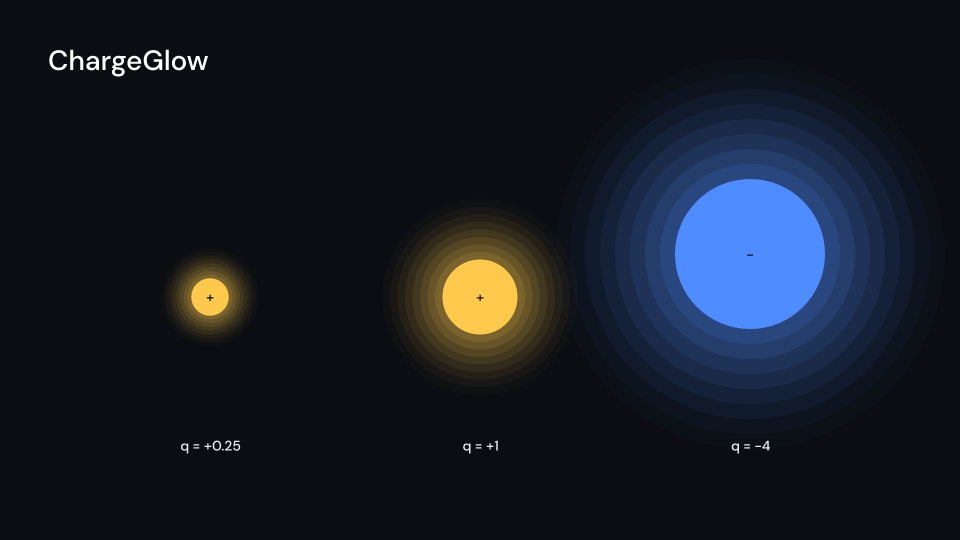
ChargeGlow 4 sThe glow follows the charge’s position in ui.space. Its disc radius is radius pixels
times the square root of the absolute charge, clamped to half through twice radius.
The sign and colour distinguish positive from negative charges.
use fframes_kit::prelude::*;
fn charge<'a>(ui: &mut Ui<'a, '_, '_>) -> Svgr<'a> {    let y = 0.7 * f64::from(ui.seconds()).sin();    ui.show(ChargeGlow {        charge: Charge::new(0.0, y, -4.0),        radius: 75.0,        ..ui.defaults()    })}
MagneticField is the field of wires in the page, by the Biot–Savart law (μ₀ left out).
A Wire::Through { x, y, current } crosses the page (current out of it when positive) and
circles its field around it; a Wire::Segment { from, to, current } lies in the page, and
its field there points out of or into the page. Where the field lies mostly in the page the
grid shows an arrow, otherwise a ⊙ (out) or ⊗ (in) sized by its strength.
magnetic_field(&wires, x, y) returns (B_x, B_y, B_z). Gallery scene: MagneticField.
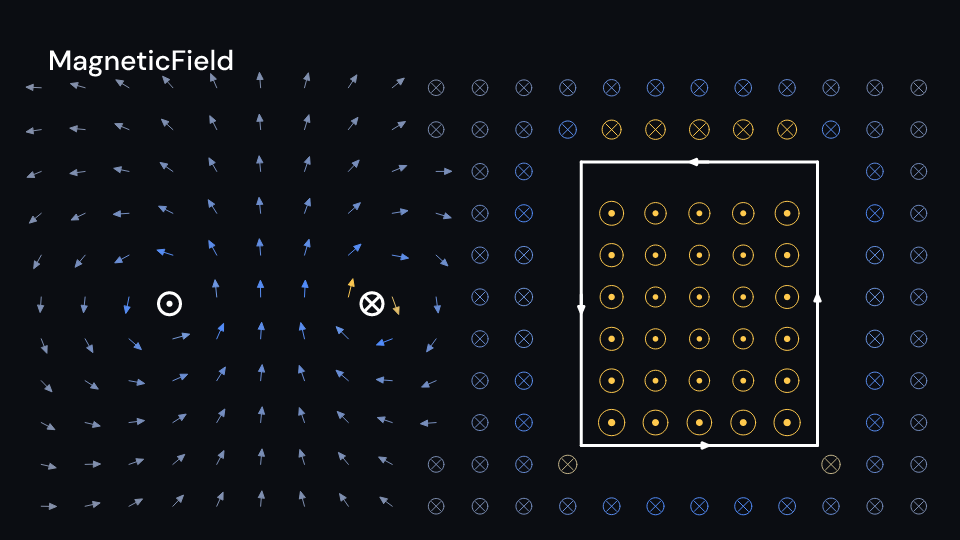
MagneticField 2 suse fframes_kit::prelude::*;
fn fields<'a>(ui: &mut Ui<'a, '_, '_>) -> Svgr<'a> { // a negative charge circling a positive one let angle = 0.6 * f64::from(ui.seconds()); let electric = ui.show(ElectricField { charges: vec![ Charge::new(-1.0, 0.0, 2.0), Charge::new(-1.0 + 3.0 * angle.cos(), 2.0 * angle.sin(), -1.0), ], lines_per_charge: 8, ..ui.defaults() }); let magnetic = ui.show(MagneticField { wires: vec![ Wire::Through { x: -2.0, y: 0.0, current: 1.0 }, Wire::Segment { from: (1.0, -1.0), to: (4.0, -1.0), current: 2.0 }, ], ..ui.defaults() }); svgr!(<g>{electric}{magnetic}</g>)}Components are plain structs. Set the fields you need and fill the rest with ..ui.defaults(): the defaults below come from the current theme (theme. values are fields of Theme).
ElectricField
Section titled “ElectricField”Manim-physics’ ElectricField: an arrow at every grid point of x_range by y_range (units of ui.space) along the field of charges, length(|E|) units long and coloured by |E| from colors[0] at min_magnitude to the last colour at max_magnitude, like ArrowVectorField. Grid points closer than clearance units to a charge get no arrow. With lines_per_charge above 0 the field lines of Field are drawn too, and with show_charges every charge as a ChargeGlow.
| Field | Type | Default | Description |
|---|---|---|---|
charges |
Vec<Charge> |
Vec::new() |
The charges that make the field; each has a position in units of ui.space and a signed strength. |
x_range |
Range |
Range::new(-7.0, 7.0, 0.5) |
Grid columns of the arrows: x from min to max in steps, in units of ui.space; the field lines run half a unit beyond. |
y_range |
Range |
Range::new(-4.0, 4.0, 0.5) |
Grid rows of the arrows: y from min to max in steps, in units of ui.space; the field lines run half a unit beyond. |
arrows |
bool |
true |
Draws the arrow at every grid point. |
length |
fn(f64) -> f64 |
sigmoid_length |
Length in units of ui.space of an arrow for a field of magnitude |E|. |
colors |
Vec<Color> |
vec![theme.colors.muted, theme.colors.accent, theme.colors.highlight] |
Colour ramp of the arrows: the first colour at min_magnitude, the last at max_magnitude. |
min_magnitude |
f64 |
0.0 |
Field magnitude that gets the first colour of colors. |
max_magnitude |
f64 |
2.0 |
Field magnitude that gets the last colour of colors. |
clearance |
f64 |
0.3 |
Grid points closer than this to a charge, in units of ui.space, get no arrow. |
lines_per_charge |
usize |
0 |
Field lines traced out of each charge; 0 draws none. |
line_color |
Color |
theme.colors.muted |
Colour of the field lines. |
show_charges |
bool |
true |
Draws every charge as a ChargeGlow. |
glow |
bool |
true |
Gives the charges a soft glow. |
charge_radius |
f32 |
26.0 |
Charge disc radius in pixels for a charge of 1. |
positive_color |
Color |
theme.colors.highlight |
Colour of positive charges. |
negative_color |
Color |
theme.colors.accent |
Colour of negative charges. |
stroke_width |
f32 |
theme.stroke.thin |
Width of the arrows and the field lines in pixels. |
enter |
Option<FadeIn> |
None |
Fade in at the start; None for none. |
exit |
Option<FadeOut> |
None |
Fade out before the end; None for none. |
Methods:
fn at(&self, x: f64, y: f64) -> (f64, f64): The field at(x, y): the sum ofq r̂ / r²overcharges.
Feature physics · Source
ChargeGlow
Section titled “ChargeGlow”Manim-physics’ Charge drawn: a disc at the charge with its sign, radius pixels for a charge of 1 and growing with the square root of |q| (half to twice that), in a soft glow with glow. Positive charges are positive_color, negative ones negative_color. The data is a Charge, which Field and ElectricField take as well.
| Field | Type | Default | Description |
|---|---|---|---|
charge |
Charge |
Charge::new(0.0, 0.0, 1.0) |
The charge to draw: position in units of ui.space and its signed strength q. |
radius |
f32 |
26.0 |
Disc radius in pixels for a charge of 1; it grows with the square root of |q|. |
glow |
bool |
true |
Draws a soft glow of rings around the disc. |
positive_color |
Color |
theme.colors.highlight |
Colour of a positive charge. |
negative_color |
Color |
theme.colors.accent |
Colour of a negative charge. |
sign_color |
Color |
theme.colors.background |
Colour of the + or − sign on the disc. |
enter |
Option<FadeIn> |
None |
Fade in at the start; None for none. |
exit |
Option<FadeOut> |
None |
Fade out before the end; None for none. |
Methods:
fn disc_radius(&self) -> f32: The disc’s radius in pixels.
Feature physics · Source
MagneticField
Section titled “MagneticField”Manim-physics’ MagneticField in the page: on every grid point of x_range by y_range (units of ui.space) the field of wires. Where it lies mostly in the page it is an arrow length(|B|) units long, otherwise a circle length(|B|) units across with a dot (out of the page) or a cross (into it). Both are coloured by |B| from colors[0] at min_magnitude to the last colour at max_magnitude. Grid points closer than clearance units to a wire are left out. With show_wires a wire through the page is a disc with a dot or a cross, a segment is a thick line with an arrow along its current. wires is a plain prop, so the field follows wires computed from ui.seconds(). Everything fades with enter and exit.
| Field | Type | Default | Description |
|---|---|---|---|
wires |
Vec<Wire> |
Vec::new() |
The wires that make the field: a long wire through the page or a segment in it, each with a current. |
x_range |
Range |
Range::new(-7.0, 7.0, 0.5) |
Grid columns: x from min to max in steps, in units of ui.space. |
y_range |
Range |
Range::new(-4.0, 4.0, 0.5) |
Grid rows: y from min to max in steps, in units of ui.space. |
length |
fn(f64) -> f64 |
sigmoid_length |
Size in units of ui.space of an arrow, or of the circle for a field out of or into the page, for a field of magnitude |B|. |
colors |
Vec<Color> |
vec![theme.colors.muted, theme.colors.accent, theme.colors.highlight] |
Colour ramp: the first colour at min_magnitude, the last at max_magnitude. |
min_magnitude |
f64 |
0.0 |
Field magnitude that gets the first colour of colors. |
max_magnitude |
f64 |
0.5 |
Field magnitude that gets the last colour of colors. |
clearance |
f64 |
0.3 |
Grid points closer than this to a wire, in units of ui.space, get no mark. |
show_wires |
bool |
true |
Draws the wires: a disc with a dot or a cross for a wire through the page, a thick line with an arrow for a segment. |
wire_color |
Color |
theme.colors.title |
Colour of the wires. |
wire_radius |
f32 |
22.0 |
Radius in pixels of the disc of a wire through the page. |
stroke_width |
f32 |
theme.stroke.thin |
Width of the arrows and rings in pixels; wires are drawn three times as thick. |
enter |
Option<FadeIn> |
None |
Fade in at the start; None for none. |
exit |
Option<FadeOut> |
None |
Fade out before the end; None for none. |
Methods:
fn at(&self, x: f64, y: f64) -> (f64, f64, f64): The field at(x, y), seemagnetic_field.
Feature physics · Source