
Machine, MachineTrace and StateMachine
Cargo featurefeatures = ["cs"]
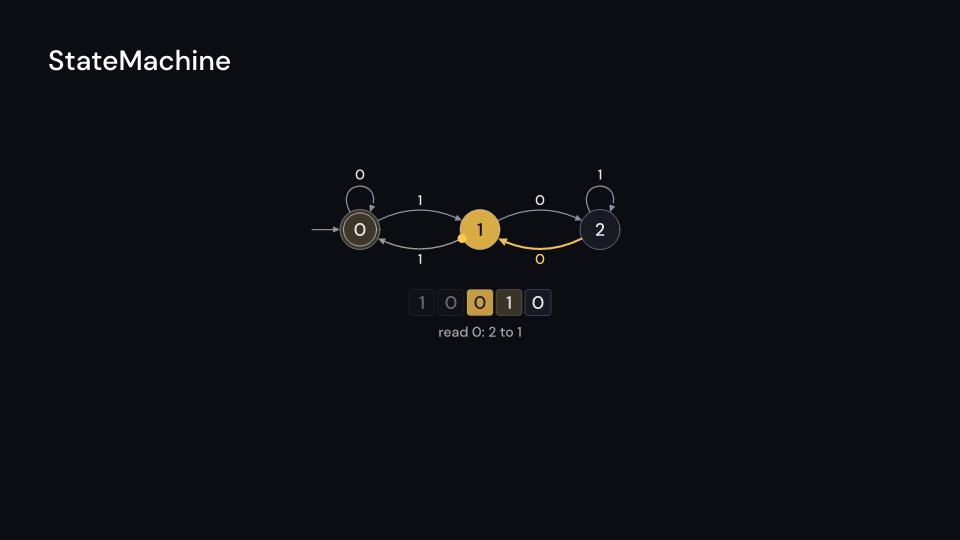
Machine::new(&states, &transitions, start, &accepting) is a finite state machine. A
transition (from, to, "0,1") reads any of its comma separated symbols. States are placed in
columns by their distance from the start (at places them yourself). MachineTrace::run(&machine, input) reads the input one character a step and stops when no transition matches;
accepted() says whether it ended in an accepting state.
StateMachine draws the states as circles (accepting states with an inner ring), an arrow
into the start state, the transitions as labelled arrows (a state’s own loops above it), a
token that travels along the transition taken, the input tape with the symbol being read
lit, and the note. The last state turns green when the input is accepted and red when it is
not. Gallery scene: StateMachine (multiples of three in binary).
StateMachine 8.5 suse fframes_kit::prelude::*;
let even = Machine::new( &["even", "odd"], &[(0, 1, "1"), (1, 0, "1"), (0, 0, "0"), (1, 1, "0")], 0, &[0],);assert!(MachineTrace::run(&even, "1001").accepted());assert!(!MachineTrace::run(&even, "1000").accepted());
fn draw_machine<'a>(ui: &mut Ui<'a, '_, '_>, trace: &'a MachineTrace) -> Svgr<'a> { ui.show(StateMachine { trace: Some(trace), ..ui.defaults() })}Components are plain structs. Set the fields you need and fill the rest with ..ui.defaults(): the defaults below come from the current theme (theme. values are fields of Theme).
StateMachine
Section titled “StateMachine”A state machine running over its input: round states radius pixels (accepting ones with a second ring), spacing pixels between columns and level pixels between rows, centred on center (units of ui.space), an arrow into the start state, labelled transitions (loops above their state, pairs that point both ways bent apart) and the input as a tape underneath. It plays a MachineTrace, one step every step_time seconds from delay: a token travels along the transition taken while the tape’s symbol lights up, the current state lights up, and at the end it turns colors.found when the input is accepted or reject_color when not. The whole figure fades with enter and exit.
| Field | Type | Default | Description |
|---|---|---|---|
trace |
Option<&MachineTrace> |
None |
The recorded steps to play (MachineTrace); None draws nothing. |
delay |
f32 |
0.0 |
Seconds after the container’s start before the first step. |
step_time |
f32 |
0.9 |
Seconds each step of the trace takes. |
center |
(f64, f64) |
(0.0, 0.0) |
The middle of the machine, in units of ui.space. |
spacing |
f32 |
240.0 |
Pixels between columns of states. |
level |
f32 |
170.0 |
Pixels between rows of states. |
radius |
f32 |
40.0 |
Radius of a state in pixels. |
tape |
bool |
true |
Whether the input is drawn as a tape under the machine. |
notes |
bool |
true |
Whether the step’s note is written under the machine. |
colors |
CellColors |
CellColors::themed(theme) |
Colours of the states in each state of the run (colors.found for an accepted input). |
edge_color |
Color |
theme.colors.muted |
Colour of the transitions and the arrow into the start state. |
active_color |
Color |
theme.colors.highlight |
Colour of the transition being taken, its label and the travelling token. |
reject_color |
Color |
Color::hex("#ff6b6b") |
Colour of the current state when the input is rejected. |
value_style |
TextStyle |
value_style |
The font of the state names and the tape symbols. |
small_style |
TextStyle |
theme.typography.caption |
The font of the transition labels and notes. |
enter |
Option<FadeIn> |
None |
Fade in at the start; None for none. |
exit |
Option<FadeOut> |
None |
Fade out before the end; None for none. |
Feature cs · Source