
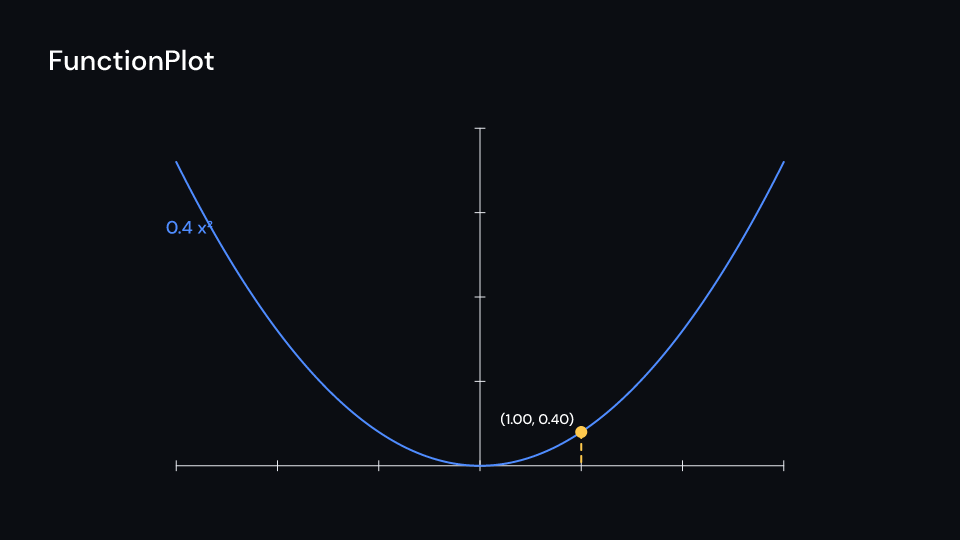
Axes with a graph, its label and a tracer: a dot that follows a tracked x along the
graph, with a dashed line down to the x-axis and the point’s coordinates. Build graph with
axes.plot on the same axes. Gallery scene: FunctionPlot.
FunctionPlot 4 suse fframes::animation::KeyFramesAnimation;use fframes_kit::prelude::*;
fn figure<'a>(ui: &mut Ui<'a, '_, '_>, x: &'a KeyFramesAnimation<f32>) -> Svgr<'a> { let axes = Axes { x_range: Range::new(-3.0, 3.0, 1.0), y_range: Range::new(-1.0, 4.0, 1.0), x_length: 9.0, y_length: 5.0, ..ui.defaults() }; let graph = axes.plot(ui, |x| 0.4 * x * x); ui.show(FunctionPlot { graph, axes, label: "0.4 x²".into(), label_at: 2.5, tracer: Some(x.into()), ..ui.defaults() })}Components are plain structs. Set the fields you need and fill the rest with ..ui.defaults(): the defaults below come from the current theme (theme. values are fields of Theme).
FunctionPlot
Section titled “FunctionPlot”| Field | Type | Default | Description |
|---|---|---|---|
axes |
Axes |
Axes::themed(theme) |
The axes the graph is drawn on. |
graph |
FunctionGraph |
FunctionGraph::themed(theme) |
The curve, built with Axes::plot on the same axes. |
label |
Cow<str> |
Cow::Borrowed("") |
Written next to the graph at label_at, empty for none. |
label_at |
f64 |
0.0 |
The x, in the axes’ coordinates, where the label sits on the graph. |
label_direction |
Anchor |
Anchor::TopRight |
Which side of that point the label is placed on. |
label_enter |
Option<FadeIn> |
None |
How the label appears; None shows it from the start. |
tracer |
Option<ValueTracker> |
None |
x of the tracer, None for no tracer. |
decimals |
usize |
2 |
Decimals of the coordinates written at the tracer. |
tracer_color |
Color |
theme.colors.highlight |
Colour of the tracer dot, its dashed line and its coordinates. |
tracer_enter |
Option<FadeIn> |
None |
Fade in of the tracer at the start; None for none. |
tracer_exit |
Option<FadeOut> |
None |
Fade out of the tracer before the end; None for none. |
Feature math · Source