
SpringMotion::new(stiffness, mass, x0, seconds) lets a block go from rest x0 meters from
its rest position, and SpringMotion::damped(stiffness, mass, damping, x0, seconds) adds
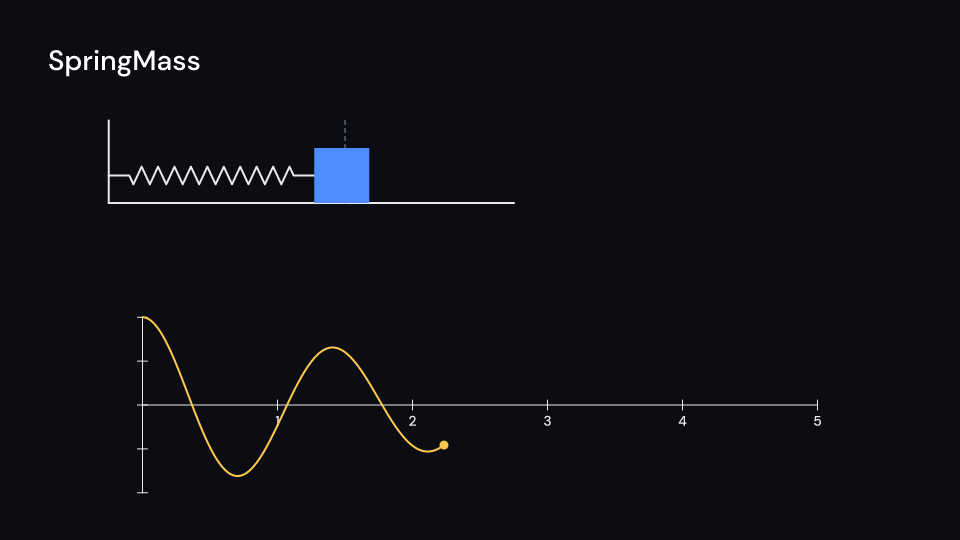
friction. SpringMass draws the block on a spring from a wall. With plot set to the map of
axes you show (time along x, displacement up y), the displacement so far draws on them with
a dot at the current value, so the block and its graph move together. trace(until, per_second) gives the same points for a plot of your own. Gallery scene: SpringMass.
SpringMass 5.5 suse std::sync::OnceLock;
use fframes_kit::prelude::*;
fn figure<'a>(ui: &mut Ui<'a, '_, '_>) -> Svgr<'a> { static MOTION: OnceLock<SpringMotion> = OnceLock::new(); let motion = MOTION.get_or_init(|| SpringMotion::damped(20.0, 1.0, 0.6, 1.0, 6.0)); let axes = Axes { x_range: Range::new(0.0, 6.0, 1.0), y_range: Range::new(-1.0, 1.0, 0.5), x_length: 9.0, y_length: 2.6, center: (0.0, -2.0), tips: false, ..ui.defaults() }; let spring = ui.show(SpringMass { motion: Some(motion), wall: (-5.5, 1.6), rest_length: 3.5, plot: Some(axes.map(ui)), ..ui.defaults() }); let axes = ui.show(axes); svgr!(<g>{axes}{spring}</g>)}Components are plain structs. Set the fields you need and fill the rest with ..ui.defaults(): the defaults below come from the current theme (theme. values are fields of Theme).
SpringMass
Section titled “SpringMass”| Field | Type | Default | Description |
|---|---|---|---|
motion |
Option<&SpringMotion> |
None |
The simulated oscillation to draw, built once in the video’s constructor; None draws nothing. |
wall |
(f64, f64) |
(-6.0, 1.5) |
Where the spring is fixed to the wall (the middle of its end), in units of ui.space. |
rest_length |
f64 |
3.0 |
Meters from the wall to the block’s near side at rest; the dashed line marks it. |
scale |
f64 |
1.0 |
Units of ui.space per meter. |
delay |
f32 |
0.0 |
Seconds after the local start before the block is let go. |
time_scale |
f32 |
1.0 |
Speed of the motion over local time; 2 runs twice as fast, 1 is real time. |
coils |
usize |
10 |
Number of turns of the zigzag that draws the spring. |
block_size |
f32 |
110.0 |
Side of the square block in pixels. |
plot |
Option<AxesMap> |
None |
Axes to plot the displacement on as the block moves (time in seconds along x, meters along y); None for no plot. Draw the axes yourself. |
color |
Color |
theme.colors.text |
Colour of the spring, the wall and the floor. |
block_color |
Color |
theme.colors.accent |
Colour of the block. |
plot_color |
Color |
theme.colors.highlight |
Colour of the displacement plot and its dot. |
guide_color |
Color |
theme.colors.muted |
Colour of the dashed rest line. |
stroke_width |
f32 |
theme.stroke.regular |
Width of the spring, the wall, the floor and the plot in pixels. |
enter |
Option<EnterAnim> |
None |
How the wall, floor and rest line draw in; None shows them from the start. |
exit |
Option<ExitAnim> |
None |
How the wall, floor and rest line leave at the end of the container; None stays. |
parts_enter |
Option<FadeIn> |
None |
How the spring, block and plot fade in; None for none. |
parts_exit |
Option<FadeOut> |
None |
How the spring, block and plot fade out before the end; None for none. |
Feature physics · Source