
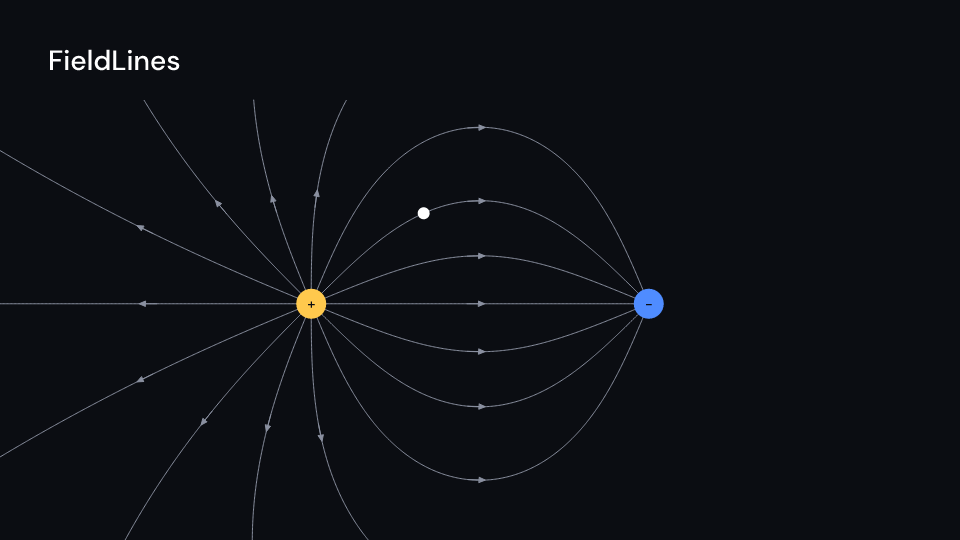
Field::new(charges, lines_per_charge, bounds) traces the field lines of point charges once
(Charge::new(x, y, q)). The lines leave the positive charges, evenly spaced, and end on a
negative charge or at bounds. FieldLines draws them on together over draw seconds, each
with an arrowhead at its middle. Then, with test_charge: Some(i), a small charge follows
line i. field.at(x, y) gives the field and field.lines() the points. Gallery scene:
FieldLines.
FieldLines 6 suse std::sync::OnceLock;
use fframes_kit::prelude::*;
fn figure<'a>(ui: &mut Ui<'a, '_, '_>) -> Svgr<'a> { static FIELD: OnceLock<Field> = OnceLock::new(); let field = FIELD.get_or_init(|| { Field::new( vec![Charge::new(-2.5, 0.0, 1.0), Charge::new(2.5, 0.0, -1.0)], 16, (-7.3, -4.1, 7.3, 4.1), ) }); ui.show(FieldLines { field: Some(field), delay: 0.5, test_charge: Some(2), ..ui.defaults() })}Components are plain structs. Set the fields you need and fill the rest with ..ui.defaults(): the defaults below come from the current theme (theme. values are fields of Theme).
FieldLines
Section titled “FieldLines”| Field | Type | Default | Description |
|---|---|---|---|
field |
Option<&Field> |
None |
The traced field to draw, built once in the video’s constructor; None draws nothing. |
delay |
f32 |
0.0 |
Seconds after the local start before the lines begin to draw. |
draw |
f32 |
1.5 |
Seconds the lines take to draw on, all together. |
arrows |
bool |
true |
Draws an arrowhead at the middle of each line. |
test_charge |
Option<usize> |
None |
Index of the line the small test charge follows after the lines are drawn; None for no test charge. |
speed |
f64 |
1.5 |
Speed of the test charge along its line in units of ui.space per second. |
charge_radius |
f32 |
30.0 |
Radius of the charge discs in pixels; the test charge is 0.4 times as big. |
positive_color |
Color |
theme.colors.highlight |
Colour of positive charges. |
negative_color |
Color |
theme.colors.accent |
Colour of negative charges. |
line_color |
Color |
theme.colors.muted |
Colour of the field lines and their arrowheads. |
test_color |
Color |
theme.colors.title |
Colour of the test charge. |
stroke_width |
f32 |
theme.stroke.thin |
Width of the field lines in pixels. |
enter |
Option<EnterAnim> |
None |
How the charges draw in; None shows them from the start. |
exit |
Option<ExitAnim> |
None |
How the charges leave at the end of the container; None stays. |
parts_enter |
Option<FadeIn> |
None |
How the lines, signs and the test charge fade in; None for none. |
parts_exit |
Option<FadeOut> |
None |
How the lines and the test charge fade out before the end; None for none. |
Feature physics · Source