
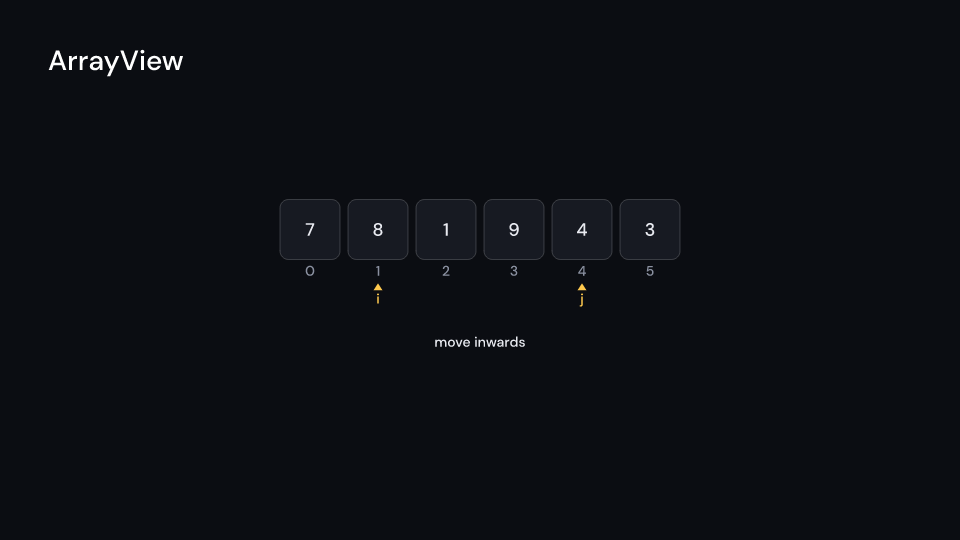
ArrayView draws a trace as a row of cells, cell pixels wide and gap apart, with the
index under each cell. Compared cells take colors.compare, moved cells travel to their new
place on an arc (the one moving right over the top, the one moving left underneath),
cells in their final place turn colors.sorted, cells out of the step’s range dim, and the
pointers slide under the cells with their names. Pointers on the same cell stack. With
notes the step’s note is written under the pointers. Light fills get dark text. An
appended cell drops in at the end and a popped one rises out, each with its index; the row is
laid out for the trace’s longest step, so the other cells stay where they are. indices
(manim-dsa’s add_indexes, on by default) writes the index row and label (add_label) a
name left of the row. Gallery scene: ArrayView (an array reversed by two pointers, from
steps of its own). The VariableBox scene also shows one that appends and pops with a label.
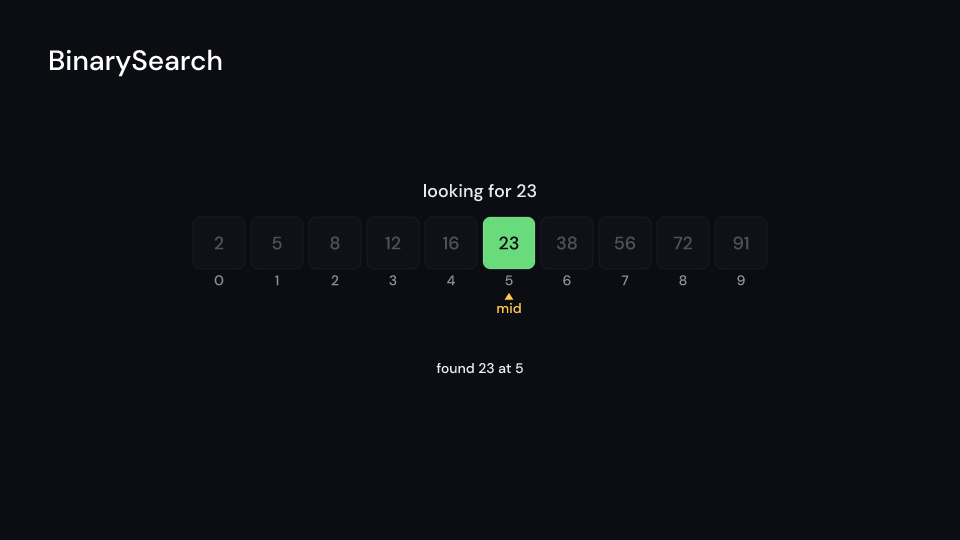
ArrayView 9 sBinarySearch is an ArrayView (its view) playing ArrayTrace::binary_search, with
“looking for 23” above the cells. Gallery scene: BinarySearch.
BinarySearch 9 suse fframes_kit::prelude::*;
fn search<'a>(ui: &mut Ui<'a, '_, '_>, trace: &'a ArrayTrace) -> Svgr<'a> { // trace = ArrayTrace::binary_search(&values, 23), built once ui.show(BinarySearch { view: ArrayView { trace: Some(trace), delay: 0.5, step_time: 0.9, cell: 104.0, ..ui.defaults() }, target: 23, ..ui.defaults() })}ArrayView can also display any recorded array trace on its own:
use fframes_kit::prelude::*;
let trace = ArrayTrace::bubble(&[4, 1, 3, 2]);
fn array<'a>(ui: &mut Ui<'a, '_, '_>, trace: &'a ArrayTrace) -> Svgr<'a> { ui.show(ArrayView { trace: Some(trace), step_time: 0.8, cell: 104.0, ..ui.defaults() })}Components are plain structs. Set the fields you need and fill the rest with ..ui.defaults(): the defaults below come from the current theme (theme. values are fields of Theme).
ArrayView
Section titled “ArrayView”An array as a row of cells with its values, placed around center (units of ui.space), each cell pixels wide and gap apart, with the index under each cell (indices, manim-dsa’s add_indexes) and label left of the row (add_label, empty for none). It plays an ArrayTrace, one step every step_time seconds from delay: compared cells light up, moved cells travel to their new place on an arc, cells in their final place turn colors.sorted, cells outside the step’s range dim and pointers move under the cells. An appended cell drops in at the end and a popped one rises out; the row is laid out for the trace’s longest step, so the other cells stay where they are. With notes the step’s note is written under the pointers. The whole figure fades with enter and exit.
| Field | Type | Default | Description |
|---|---|---|---|
trace |
Option<&ArrayTrace> |
None |
The recorded steps to play (ArrayTrace); None draws nothing. |
delay |
f32 |
0.0 |
Seconds after the container’s start before the first step. |
step_time |
f32 |
0.6 |
Seconds each step of the trace takes. |
center |
(f64, f64) |
(0.0, 0.0) |
The middle of the row, in units of ui.space. |
cell |
f32 |
96.0 |
Width and height of one cell in pixels. |
gap |
f32 |
12.0 |
Space between neighbouring cells in pixels. |
indices |
bool |
true |
Whether the index of each cell is written under it. |
label |
&str |
"" |
Text written left of the row; empty for none. |
notes |
bool |
true |
Whether the step’s note is written under the pointers. |
colors |
CellColors |
CellColors::themed(theme) |
Colours of the cells in each state (compared, moved, sorted, found). |
pointer_color |
Color |
theme.colors.highlight |
Colour of the pointer names and arrows under the cells. |
index_color |
Color |
theme.colors.muted |
Colour of the indices under the cells. |
label_color |
Color |
theme.colors.text |
Colour of the label left of the row. |
value_style |
TextStyle |
value_style |
The font of the values in the cells. |
small_style |
TextStyle |
theme.typography.caption |
The font of the indices, pointer names and notes. |
enter |
Option<FadeIn> |
None |
Fade in at the start; None for none. |
exit |
Option<FadeOut> |
None |
Fade out before the end; None for none. |
Methods:
fn slot_x(&self, middle: f64, n: usize, slot: f64) -> f64: The pixel centre of slotslot(fractional while cells move) forncells.
Feature cs · Source
BinarySearch
Section titled “BinarySearch”ArrayView playing ArrayTrace::binary_search, with what it looks for written above the cells ("looking for 23"). The search’s range dims the cells it has ruled out, and the lo, mid and hi pointers move under the cells.
| Field | Type | Default | Description |
|---|---|---|---|
view |
ArrayView |
ArrayView { step_time: 0.9, ..ArrayView::themed(theme) } |
The array view that plays the search; its trace should be ArrayTrace::binary_search. |
target |
i64 |
0 |
The value the search looks for, written in the caption. |
caption |
bool |
true |
Whether looking for .. is written above the cells. |
caption_color |
Color |
theme.colors.text |
Colour of the caption. |
Feature cs · Source