
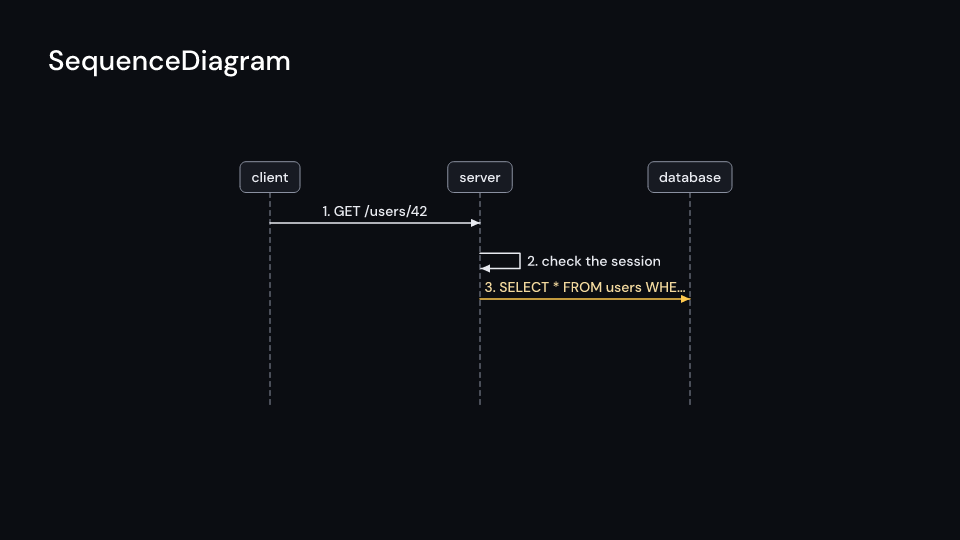
SequenceDiagram draws participants as boxes along the top, spacing pixels apart, with
dashed lifelines below, and sends one of messages every step_time seconds from delay, each
row pixels below the one before. A packet travels from the sender’s lifeline to the receiver’s
in the first travel of its step, drawing the arrow behind it, and turns into the arrowhead when
it lands. The label appears above the arrow, numbered with numbers and cut with … to fit
between the lifelines. Message::new(from, to, label) is a call, Message::reply is dashed, and a
message to the sender itself loops out to the right. The message being sent is lit in
active_color. Gallery scene: SequenceDiagram (a request through a server to a database).
SequenceDiagram 7 suse fframes_kit::prelude::*;
fn request<'a>(ui: &mut Ui<'a, '_, '_>) -> Svgr<'a> { ui.show(SequenceDiagram { participants: vec!["client".into(), "server".into()], messages: vec![ Message::new(0, 1, "GET /users/42"), Message::new(1, 1, "check the session"), Message::reply(1, 0, "200 OK"), ], delay: 0.5, ..ui.defaults() })}Components are plain structs. Set the fields you need and fill the rest with ..ui.defaults(): the defaults below come from the current theme (theme. values are fields of Theme).
SequenceDiagram
Section titled “SequenceDiagram”| Field | Type | Default | Description |
|---|---|---|---|
participants |
Vec<String> |
Vec::new() |
Names of the participants, left to right; each is a box on top of a dashed lifeline. |
messages |
Vec<Message> |
Vec::new() |
The messages in sending order, one per step; each goes between two participants. |
delay |
f32 |
0.0 |
Seconds after the container’s start before the first message is sent. |
step_time |
f32 |
1.0 |
Seconds between the start of one message and the start of the next. |
travel |
f32 |
0.6 |
Fraction of step_time, 0..1, a packet takes to travel from sender to receiver. |
center |
(f64, f64) |
(0.0, 0.0) |
The middle of the diagram, in units of ui.space. |
spacing |
f32 |
420.0 |
Pixels between neighbouring lifelines. |
row |
f32 |
76.0 |
Pixels between one message and the next below it. |
numbers |
bool |
true |
Whether the message labels are numbered. |
box_color |
Color |
theme.colors.surface |
Fill of the participant boxes. |
line_color |
Color |
theme.colors.muted |
Colour of the lifelines and the box outlines. |
message_color |
Color |
theme.colors.text |
Colour of the arrows of messages already sent. |
active_color |
Color |
theme.colors.highlight |
Colour of the message being sent. |
text_color |
Color |
theme.colors.text |
Colour of the participant names and the message labels. |
name_style |
TextStyle |
name_style |
The font of the participant names. |
label_style |
TextStyle |
theme.typography.caption |
The font of the message labels. |
enter |
Option<FadeIn> |
None |
Fade in at the start; None for none. |
exit |
Option<FadeOut> |
None |
Fade out before the end; None for none. |
Feature cs · Source