
OpticalBench, Lens and Ray
Cargo featurefeatures = ["physics"]
OpticalBench is manim-physics’ Lens and Ray: lenses on one horizontal axis, and
rays traced through them from left to right. Lens::thin(x, focal) is a thin lens,
Lens::thick(x, r1, r2, index, thickness) a real one from its radii, refractive index and
thickness (focal_length() is the lensmaker’s equation). Radii are positive when the centre
of curvature is to the right, so a biconvex lens has r1 > 0 and r2 < 0; a flat side is
f64::INFINITY. The rays are traced with paraxial optics, surface by surface, and a ray that
meets a lens outside its height stops there. Each lens shows its front and back focal
points, F and F', found by tracing a parallel ray, so a thick lens’s sit at its focal
distances from its surfaces. Gallery scenes: OpticalBench, Lens.
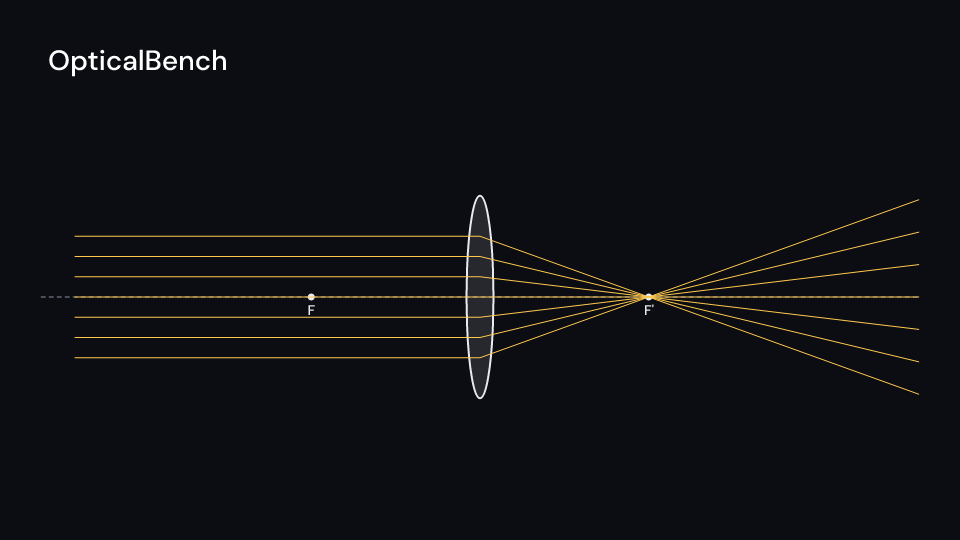
OpticalBench 3.5 s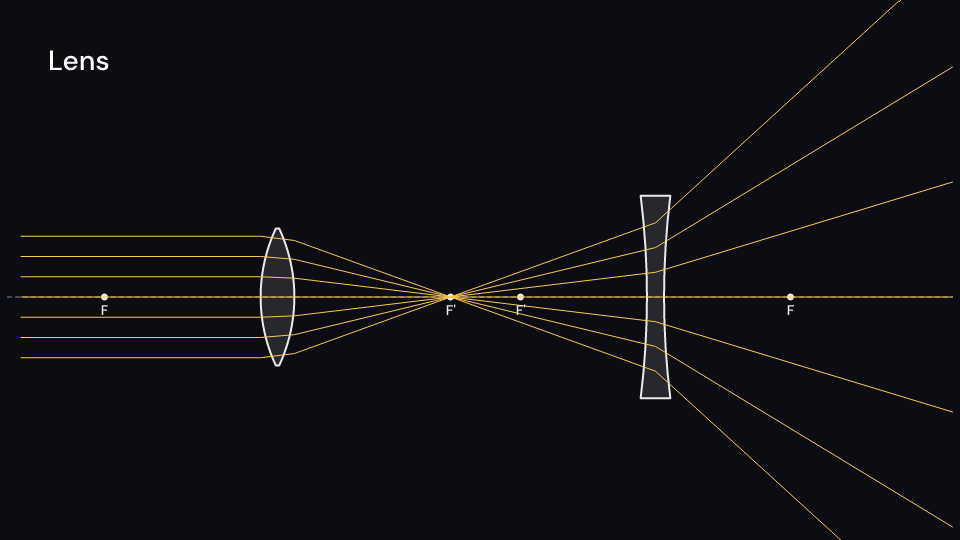
Lens 3.5 sParallel rays focus through a thin lens:
use fframes_kit::prelude::*;
fn bench<'a>(ui: &mut Ui<'a, '_, '_>) -> Svgr<'a> {    let rays = (0..7)        .map(|i| Ray::new((-6.0, -0.9 + 0.3 * f64::from(i)), (1.0, 0.0)))        .collect();    ui.show(OpticalBench {        lenses: vec![Lens::thin(0.0, 2.5)],        rays,        x_range: (-6.5, 6.5),        delay: 0.5,        enter: Some(Create::default().into()),        ..ui.defaults()    })}
For a thick lens followed by a diverging thin lens:
use fframes_kit::prelude::*;
fn bench<'a>(ui: &mut Ui<'a, '_, '_>) -> Svgr<'a> { let rays = (0..7) .map(|i| Ray::new((-6.8, -0.9 + 0.3 * f64::from(i)), (1.0, 0.0))) .collect(); ui.show(OpticalBench { lenses: vec![Lens::thick(-3.0, 2.4, -2.4, 1.5, 0.5), Lens::thin(2.6, -2.0)], rays, delay: 0.5, ..ui.defaults() })}Components are plain structs. Set the fields you need and fill the rest with ..ui.defaults(): the defaults below come from the current theme (theme. values are fields of Theme).
OpticalBench
Section titled “OpticalBench”Manim-physics’ Lens and Ray on one axis: lenses on a horizontal axis at height axis_y from x_range.0 to x_range.1 (units of ui.space), and rays traced through them to x_range.1. With focal_points each lens’s front and back focal points are dots labelled F and F', found by tracing a parallel ray through the lens, so for a thick lens they sit at its focal distances from its surfaces, not from its middle. The rays draw on one after another from delay seconds after the local start (ray_time each, stagger apart). The axis and lenses draw with enter, the rays and labels with parts_enter.
| Field | Type | Default | Description |
|---|---|---|---|
lenses |
Vec<Lens> |
Vec::new() |
The lenses on the axis, each with its position and shape. |
rays |
Vec<Ray> |
Vec::new() |
The rays traced through the lenses to the right end of x_range. |
axis_y |
f64 |
0.0 |
Height of the horizontal axis, in units of ui.space. |
x_range |
(f64, f64) |
(-7.0, 7.0) |
Left and right ends of the axis in units of ui.space; rays are traced up to the right end. |
focal_points |
bool |
true |
Marks each lens’s front and back focal points with a dot. |
labels |
bool |
true |
Writes F and F' under the focal points. |
delay |
f32 |
0.0 |
Seconds after the local start before the first ray begins to draw. |
ray_time |
f32 |
0.8 |
Seconds each ray takes to draw. |
stagger |
f32 |
0.25 |
Seconds between the start of one ray and the next. |
lens_color |
Color |
theme.colors.text |
Colour of the lenses, the focal points and their labels. |
ray_color |
Color |
theme.colors.highlight |
Colour of the rays. |
guide_color |
Color |
theme.colors.muted |
Colour of the dashed axis. |
stroke_width |
f32 |
theme.stroke.regular |
Width of the lens outlines in pixels; rays use the theme’s thin width. |
enter |
Option<EnterAnim> |
None |
How the axis and lenses draw in; None shows them from the start. |
exit |
Option<ExitAnim> |
None |
How the axis and lenses leave at the end of the container; None stays. |
parts_enter |
Option<FadeIn> |
None |
How the rays and labels fade in; None for none. |
parts_exit |
Option<FadeOut> |
None |
How the rays and labels fade out before the end; None for none. |
Feature physics · Source