
A DecisionTree is a trained tree given as data: its nodes with the root first, the names
of its features and of its classes. DecisionNode::Split { feature, threshold, left, right } sends a sample whose feature is at most threshold to the node left, the others
to right; DecisionNode::Leaf { class } predicts a class. predict(&sample) follows the
tests. A child index out of range or a node reached twice ends that branch.
DecisionTreeDiagram. The tree with the root at the top,levelpixels between levels. A split is a box with its test (petal length ≤ 2.45) and a leaf a box with its class, in that class’s colour fromclass_colors. The edge to the left child is labelled yes and the other no. The boxes are as wide as the longest text and at leastnode_width.DecisionSurface. The feature space ofaxes(anAxesMap, as inNormalFit) cut into the regions of the leaves, each filled in its class’s colour atopacity, with the cuts drawn inline_color.x_featureandy_featureare the features along the axes; the tree should split on these two only, because a split on another feature gives both its sides its whole region. Show it before theAxesso their lines stay on top.- Growing.
reveal: Some(TreeReveal { order, start, step })shows a level (RevealOrder::LevelByLevel) or a node (RevealOrder::BreadthFirst) everystepseconds fromstart. Give the diagram and the surface the same reveal: a cut appears with its split and a region with its leaf.
Gallery scenes: DecisionTreeDiagram, DecisionSurface, DecisionTree (the iris tree beside its feature space).
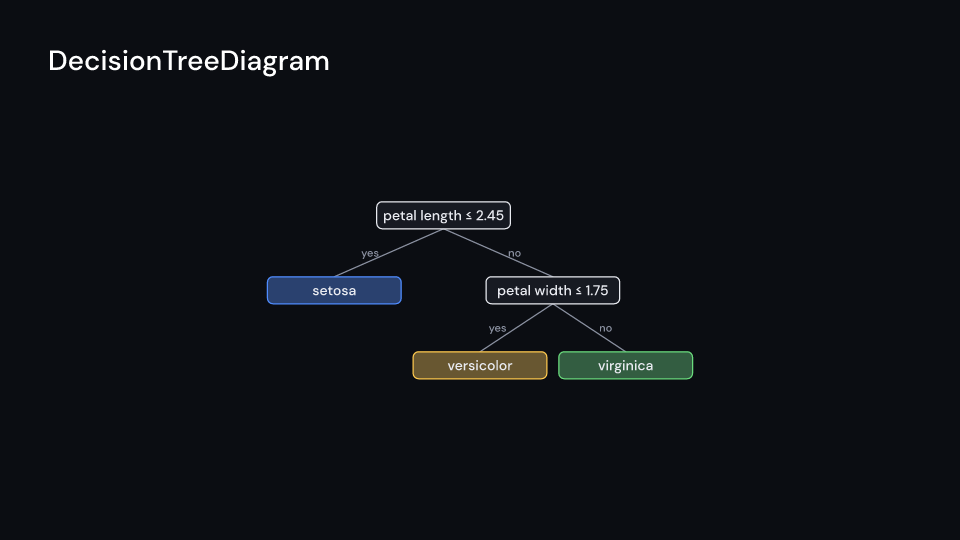
DecisionTreeDiagram 5 s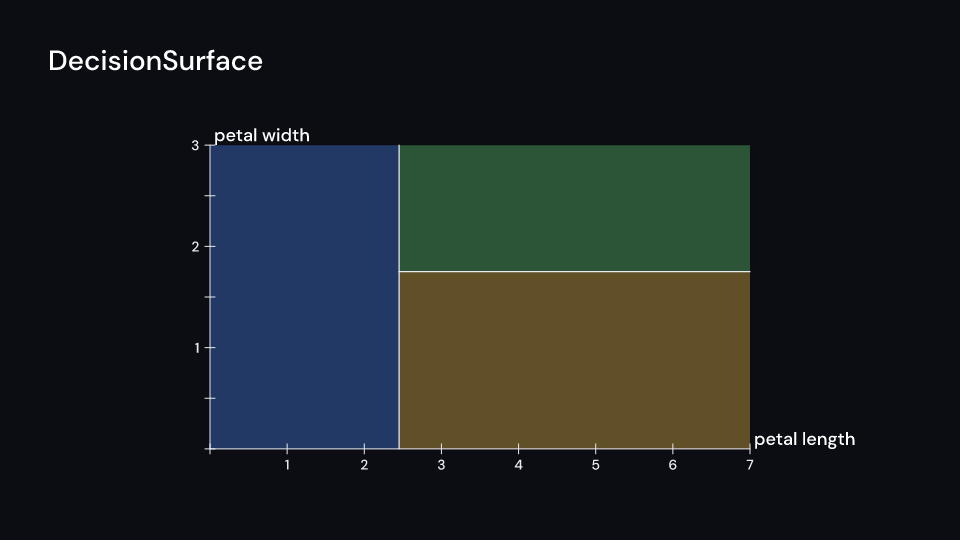
DecisionSurface 5 s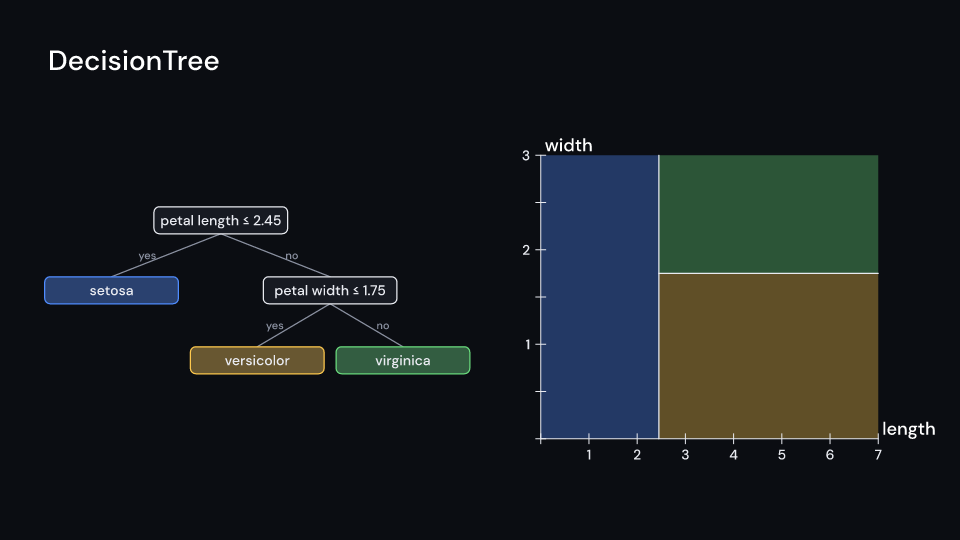
DecisionTree 5 sBuild the tree once, then pass it to either drawing. Both use the same reveal so their nodes, cuts and regions appear together.
use fframes_kit::prelude::*;
fn iris_tree() -> DecisionTree<'static> {    DecisionTree {        nodes: vec![            DecisionNode::Split { feature: 0, threshold: 2.45, left: 1, right: 2 },            DecisionNode::Leaf { class: 0 },            DecisionNode::Split { feature: 1, threshold: 1.75, left: 3, right: 4 },            DecisionNode::Leaf { class: 1 },            DecisionNode::Leaf { class: 2 },        ],        features: vec!["petal length", "petal width"],        classes: vec!["setosa", "versicolor", "virginica"],    }}
fn tree_diagram<'a>(ui: &mut Ui<'a, '_, '_>, tree: &DecisionTree<'a>) -> Svgr<'a> {    ui.show(DecisionTreeDiagram {        tree: tree.clone(),        reveal: Some(TreeReveal { order: RevealOrder::BreadthFirst, start: 0.7, step: 0.6 }),        ..ui.defaults()    })}
fn tree_surface<'a>(ui: &mut Ui<'a, '_, '_>, tree: &DecisionTree<'a>) -> Svgr<'a> { let axes = Axes { x_range: Range::new(0.0, 7.0, 1.0), y_range: Range::new(0.0, 3.0, 0.5), x_label: Some("petal length".into()), y_label: Some("petal width".into()), ..ui.defaults() }; let surface = ui.show(DecisionSurface { tree: tree.clone(), axes: axes.map(ui), reveal: Some(TreeReveal { order: RevealOrder::BreadthFirst, start: 0.7, step: 0.6 }), ..ui.defaults() }); let axes = ui.show(axes); svgr!(<g>{surface}{axes}</g>)}Components are plain structs. Set the fields you need and fill the rest with ..ui.defaults(): the defaults below come from the current theme (theme. values are fields of Theme).
DecisionTreeDiagram
Section titled “DecisionTreeDiagram”A decision tree as ManimML draws it (DecisionTreeDiagram): each split a box with its test (feature ≤ threshold), each leaf a box with its class in that class’s colour from class_colors, the root at the top, level pixels between levels and gap pixels between neighbouring leaves. The edge to the left child, the samples that pass the test, is labelled yes. The boxes are as wide as the longest text and at least node_width. With reveal the tree grows a level or a node at a time.
| Field | Type | Default | Description |
|---|---|---|---|
tree |
DecisionTree |
DecisionTree::default() |
The splits and leaves to draw, with the feature and class names. |
center |
(f64, f64) |
(0.0, 0.0) |
The middle of the tree, in units of ui.space. |
node_width |
f32 |
190.0 |
Minimum width in pixels of a node box; boxes grow to fit the longest text. |
node_height |
f32 |
54.0 |
Height in pixels of a node box. |
gap |
f32 |
24.0 |
Pixels between neighbouring node boxes. |
level |
f32 |
110.0 |
Pixels between one level of the tree and the next. |
reveal |
Option<TreeReveal> |
None |
Grows the tree a level or a node at a time; None shows it whole. |
class_colors |
Vec<Color> |
class_colors(theme) |
Colour of each class, by class index, for the leaf boxes; a class past the end uses node_color. |
node_color |
Color |
theme.colors.text |
Colour of the split boxes’ outline and of all node text. |
node_fill |
Color |
theme.colors.surface |
Fill colour of the node boxes (leaves mix in their class colour). |
edge_color |
Color |
theme.colors.muted |
Colour of the edges and their yes/no labels. |
text_style |
TextStyle |
theme.typography.caption |
The font of the node text and edge labels: family, size in pixels and weight. |
stroke_width |
f32 |
2.5 |
Width in pixels of the node outlines and edges. |
enter |
Option<FadeIn> |
None |
Fade in at the start; None for none. |
exit |
Option<FadeOut> |
None |
Fade out before the end; None for none. |
Methods:
fn layout_at(&self, middle: Point) -> Vec<Option<Rect>>: The box of every node with the middle of the tree atmiddle,node_widthpixels wide;Nonefor the nodes not reached from the root.fn layout(&self, ui: &Ui) -> Vec<Option<Rect>>: The box of every node, in pixels, all as wide as the longest text needs and at leastnode_width.
Feature ml · Source
DecisionSurface
Section titled “DecisionSurface”The partition of a 2D feature space by a decision tree (ManimML’s DecisionTreeSurface): every leaf’s region of the box of axes filled in its class’s colour at opacity, and the cuts of the splits drawn in line_color. x_feature and y_feature are the features along the axes; the tree should split on these two only. With the reveal of a DecisionTreeDiagram a cut appears with its split and a region with its leaf. Draw the Axes after it to keep their lines on top.
| Field | Type | Default | Description |
|---|---|---|---|
tree |
DecisionTree |
DecisionTree::default() |
The splits and leaves whose partition is drawn. |
axes |
AxesMap |
AxesMap::default() |
The axes of the feature space to fill, mapping feature values to the canvas. |
x_feature |
usize |
0 |
Index of the feature along the x-axis. |
y_feature |
usize |
1 |
Index of the feature along the y-axis. |
reveal |
Option<TreeReveal> |
None |
A cut appears with its split and a region with its leaf; None shows everything. |
class_colors |
Vec<Color> |
class_colors(theme) |
Colour of each class, by class index, for the regions; a class past the end uses line_color. |
opacity |
f32 |
0.35 |
0 transparent to 1 opaque, of the filled regions. |
line_color |
Color |
theme.colors.text |
Colour of the cuts drawn for the splits. |
stroke_width |
f32 |
2.5 |
Width in pixels of the cut lines. |
enter |
Option<FadeIn> |
None |
Fade in at the start; None for none. |
exit |
Option<FadeOut> |
None |
Fade out before the end; None for none. |
Feature ml · Source