
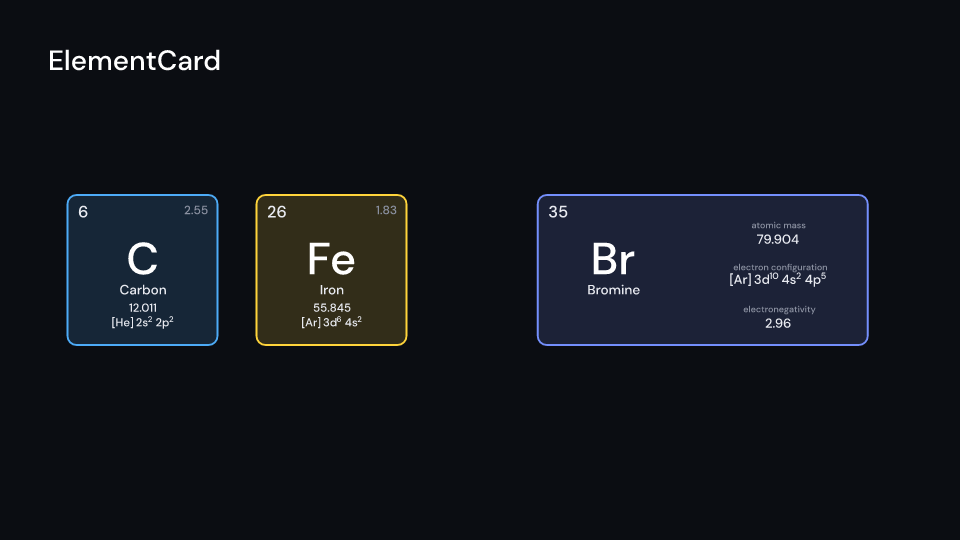
ElementCard is the larger card of one element, size pixels high: the atomic number, the
symbol, the name, the atomic mass, the ground state electron configuration and the Pauling
electronegativity, tinted like ElementTile.
- Layouts.
CardLayout::Squareputs the number and the electronegativity in the top corners and the rest under each other.CardLayout::Wideis twice as wide: the number, symbol and name on the left, the other three listed with their names on the right. - Values. The mass is the standard atomic weight to three decimals, or the mass number of
the most stable isotope in brackets (
[294]). The configuration comes frommendeleevwith the electron counts drawn as raised runs, so the font needs no superscript digits. - Electronegativity.
mendeleevhas none, so the kit carries the Pauling values of Wikipedia’s electronegativity data page (electronegativity(9)isSome(3.98)). He, Ne, Ar, Rn and the elements from Rf have none, Pm, Eu and Yb only a range: a square card leaves the corner empty, a wide card writesn/a.
Gallery scene: ElementCard (carbon and iron square, bromine wide).
ElementCard 2 suse fframes_kit::prelude::*;
fn card<'a>(ui: &mut Ui<'a, '_, '_>) -> Svgr<'a> { ui.show(ElementCard { element: 26, size: 300.0, layout: CardLayout::Wide, ..ui.defaults() })}Components are plain structs. Set the fields you need and fill the rest with ..ui.defaults(): the defaults below come from the current theme (theme. values are fields of Theme).
ElementCard
Section titled “ElementCard”| Field | Type | Default | Description |
|---|---|---|---|
element |
u32 |
6 |
Atomic number of the element shown. |
center |
(f64, f64) |
(0.0, 0.0) |
The middle of the card, in units of ui.space. |
size |
f32 |
320.0 |
Height of the card in pixels; the Square layout is as wide, Wide is 2.2 times as wide, and the text scales with it. |
layout |
CardLayout |
CardLayout::Square |
How the facts are arranged: Square (stacked) or Wide (tile with a list beside it). |
category_colors |
bool |
true |
Tints the card with the colour of the element’s category; false uses color. |
color |
Color |
theme.colors.accent |
Tint of the card’s background and border when category_colors is false. |
text_color |
Color |
theme.colors.text |
Colour of the name, mass, configuration and number. |
enter |
Option<FadeIn> |
None |
Fade in at the start; None for none. |
exit |
Option<FadeOut> |
None |
Fade out before the end; None for none. |
Feature chemistry · Source