
Manim-physics’ Space and SpaceScene. RigidMotion::new(bodies, gravity, seconds) runs
rapier once at 60 steps a second, in the video’s constructor. The same
bodies give the same motion every time (enhanced-determinism). A Body is
Body::circle, Body::rect, Body::polygon (the convex hull of its points) or
Body::wall(a, b, thickness), which is fixed. It is set up with velocity, spin,
angle, fixed, restitution, friction, density and color. poses(t) gives every
body’s Pose (x, y, and an angle that counts whole turns). RigidWorld draws the
bodies, filled and outlined, with a radius on circles that shows them turning. Its draw
closure gets a BodyView (index, center in pixels, rotation in degrees for SVG rotate(),
pixels per unit) and returns its own drawing, or None to keep the default. Rapier adds
about 2 MB to an editor bridge built with physics. Gallery scene: RigidWorld.
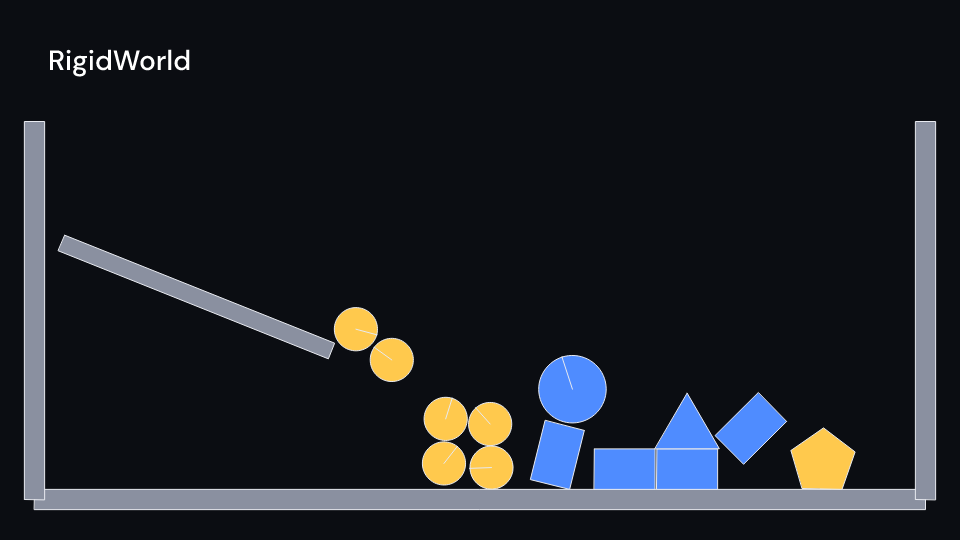
RigidWorld 4 suse fframes_kit::prelude::*;
struct Video { world: RigidMotion,}
impl Video { fn new() -> Self { let bodies = vec![ Body::wall((-6.0, -3.0), (6.0, -3.0), 0.3), Body::circle(-2.0, 2.0, 0.4).velocity(1.5, 0.0).restitution(0.8), Body::rect(1.0, 1.0, 1.0, 0.6).angle(0.4), ]; Self { world: RigidMotion::new(bodies, (0.0, -9.81), 5.0), } }
fn figure<'a>(&'a self, ui: &mut Ui<'a, '_, '_>) -> Svgr<'a> { ui.show(RigidWorld { motion: Some(&self.world), ..ui.defaults() }) }}Components are plain structs. Set the fields you need and fill the rest with ..ui.defaults(): the defaults below come from the current theme (theme. values are fields of Theme).
RigidWorld
Section titled “RigidWorld”| Field | Type | Default | Description |
|---|---|---|---|
motion |
Option<&RigidMotion> |
None |
The simulated bodies to draw, built once in the video’s constructor; None draws nothing. |
delay |
f32 |
0.0 |
Seconds after the local start before the simulation starts to play. |
time_scale |
f32 |
1.0 |
Speed of the motion over local time; 2 runs twice as fast, 1 is real time. |
draw |
Option<DrawBody> |
None |
Draws a body in your own way: a closure given its BodyView that returns the picture, or None to leave it to the default shape. |
fill_color |
Color |
theme.colors.accent |
Fill of a body that has no colour of its own. |
fixed_color |
Color |
theme.colors.muted |
Fill of fixed bodies such as walls. |
stroke_color |
Color |
theme.colors.text |
Colour of the outline, and of the radius that shows a circle turning. |
stroke_width |
f32 |
theme.stroke.thin |
Outline width in pixels. |
enter |
Option<FadeIn> |
None |
Fade in at the start; None for none. |
exit |
Option<FadeOut> |
None |
Fade out before the end; None for none. |
Feature physics · Source