
FractionBar and FractionPie
Cargo featurefeatures = ["math"]
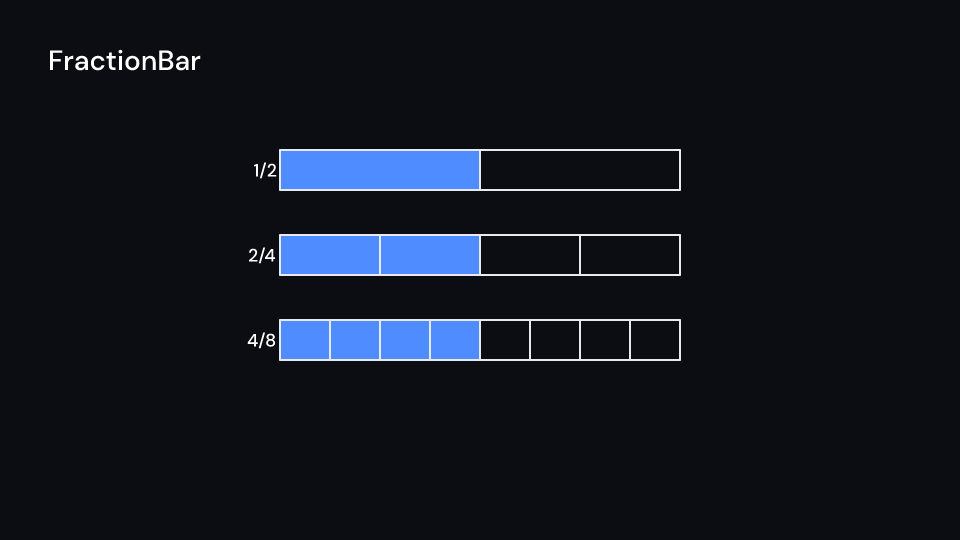
A bar or a circle cut into denominator equal parts, of which the first numerator fill one
after another (stagger seconds apart, from delay). Bars of the same width stacked under
each other show equal fractions lining up. The fraction is written next to the bar or under
the circle. Both are placed in pixels. Gallery scenes: FractionBar, FractionPie, Fractions.
FractionBar 4 s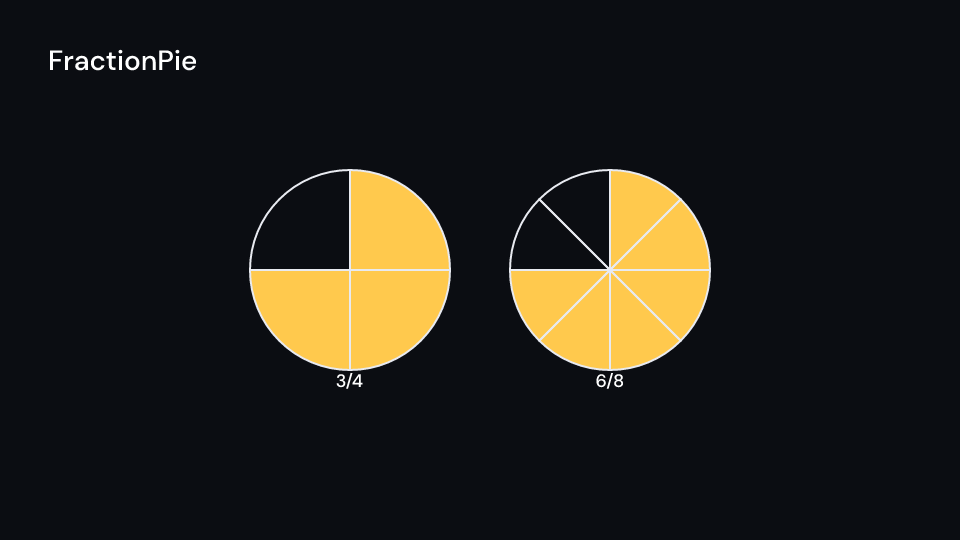
FractionPie 4 s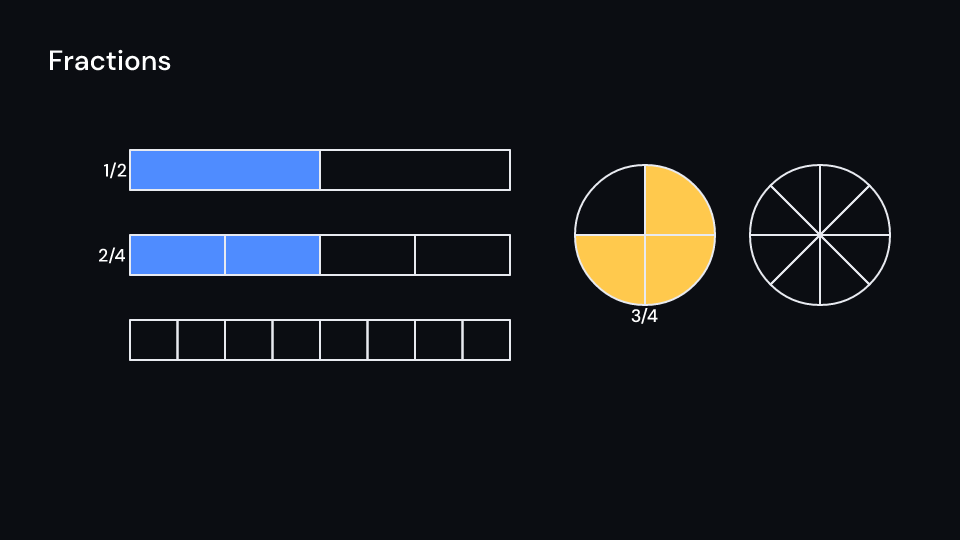
Fractions 4 suse fframes_kit::prelude::*;
fn figure<'a>(ui: &mut Ui<'a, '_, '_>) -> Svgr<'a> { let bars: Vec<Svgr> = [2, 4, 8] .into_iter() .enumerate() .map(|(row, d)| { ui.show(FractionBar { numerator: d / 2, denominator: d, y: 300.0 + row as f32 * 170.0, delay: row as f32 * 0.6, ..ui.defaults() }) }) .collect(); let pie = ui.show(FractionPie { numerator: 3, denominator: 4, cx: 1600.0, ..ui.defaults() }); let bars: Svgr = bars.into(); svgr!(<g>{bars}{pie}</g>)}Each component also works on its own:
use fframes_kit::prelude::*;
fn bar<'a>(ui: &mut Ui<'a, '_, '_>) -> Svgr<'a> {    ui.show(FractionBar {        numerator: 2, denominator: 4, delay: 0.8, stagger: 0.3, ..ui.defaults()    })}
fn pie<'a>(ui: &mut Ui<'a, '_, '_>) -> Svgr<'a> { ui.show(FractionPie { numerator: 3, denominator: 4, delay: 0.8, stagger: 0.3, ..ui.defaults() })}Components are plain structs. Set the fields you need and fill the rest with ..ui.defaults(): the defaults below come from the current theme (theme. values are fields of Theme).
FractionBar
Section titled “FractionBar”A bar of width x height pixels at (x, y) (top left) cut into denominator equal parts, of which the first numerator fill one after another. Bars of the same width stacked under each other show equal fractions lining up (1/2, 2/4, 4/8). The outline and the cuts draw with enter; with label the fraction is written left of the bar.
| Field | Type | Default | Description |
|---|---|---|---|
numerator |
usize |
1 |
Number of parts that fill. |
denominator |
usize |
2 |
Number of equal parts the bar is cut into; 0 draws nothing. |
x |
f32 |
560.0 |
Left edge of the bar, in pixels of the canvas. |
y |
f32 |
500.0 |
Top edge of the bar, in pixels of the canvas. |
width |
f32 |
800.0 |
Width of the whole bar in pixels. |
height |
f32 |
80.0 |
Height of the bar in pixels. |
color |
Color |
theme.colors.accent |
Fill of the filled parts. |
stroke |
Color |
theme.colors.text |
Colour of the outline and the cuts. |
stroke_width |
f32 |
theme.stroke.regular |
Outline width in pixels. |
delay |
f32 |
0.0 |
Seconds after the container’s start before the first part fills. |
stagger |
f32 |
0.15 |
Seconds between one part starting to fill and the next. |
run_time |
f32 |
theme.motion.duration.base |
Seconds each part takes to fill. |
rate_func |
RateFunc |
RateFunc::default() |
Easing of each part’s fill over its run time. |
label |
bool |
true |
Writes the fraction left of the bar when true. |
label_style |
TextStyle |
theme.typography.body |
The font of the fraction: family, size in pixels and weight. |
enter |
Option<EnterAnim> |
None |
How the outline and the cuts appear; None shows them from the start. |
Feature math · Source
FractionPie
Section titled “FractionPie”A circle of radius pixels around (cx, cy) cut into denominator equal slices from the top, clockwise, of which the first numerator fill one after another. With label the fraction is written under the circle.
| Field | Type | Default | Description |
|---|---|---|---|
numerator |
usize |
1 |
Number of slices that fill. |
denominator |
usize |
4 |
Number of equal slices the circle is cut into; 0 draws nothing. |
cx |
f32 |
960.0 |
Centre of the circle, x in pixels of the canvas. |
cy |
f32 |
540.0 |
Centre of the circle, y in pixels of the canvas. |
radius |
f32 |
200.0 |
Radius of the circle in pixels. |
color |
Color |
theme.colors.highlight |
Fill of the filled slices. |
stroke |
Color |
theme.colors.text |
Colour of the outline and the cuts. |
stroke_width |
f32 |
theme.stroke.regular |
Outline width in pixels. |
delay |
f32 |
0.0 |
Seconds after the container’s start before the first slice fills. |
stagger |
f32 |
0.15 |
Seconds between one slice starting to fill and the next. |
run_time |
f32 |
theme.motion.duration.base |
Seconds each slice takes to fill. |
rate_func |
RateFunc |
RateFunc::default() |
Easing of each slice’s fill over its run time. |
label |
bool |
true |
Writes the fraction under the circle when true. |
label_style |
TextStyle |
theme.typography.body |
The font of the fraction: family, size in pixels and weight. |
enter |
Option<EnterAnim> |
None |
How the outline and the cuts appear; None shows them from the start. |
Feature math · Source