
Symbol draws one circuit part: SymbolKind::Resistor, Capacitor, Inductor,
VoltageSource, CurrentSource, Ground, Opamp (Manim-circuit’s set), and Battery,
Switch { closes_at }, Bulb and Diode. It sits at at, turned rotation degrees
counterclockwise, size units from its middle to a terminal, with an optional label.
terminal(name) gives where a wire attaches: a and b for every two-terminal part (also
- and + on the sources and the battery, anode and cathode on the diode), a on top of
Ground, and -, +, out on the op-amp.
Gallery scenes: Symbol, Schematic.
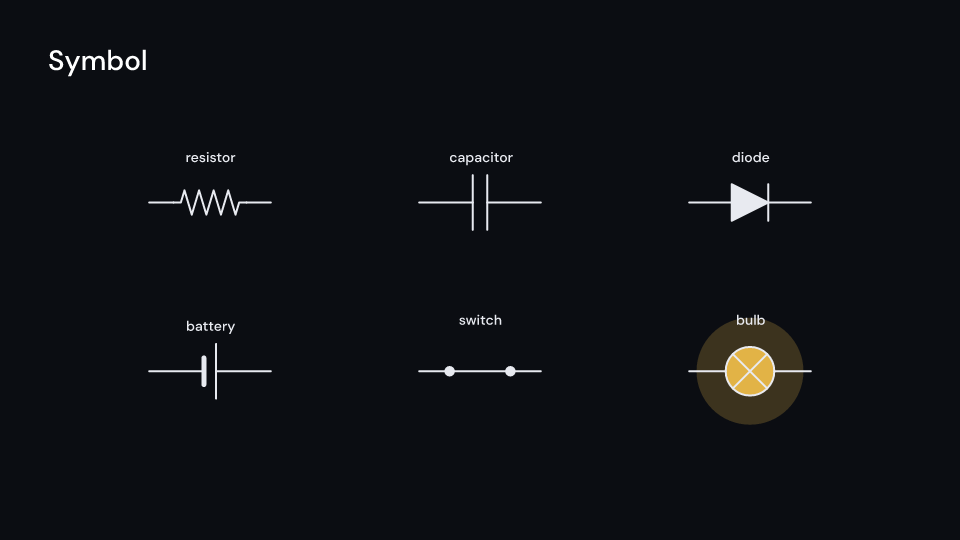
Symbol 3.5 s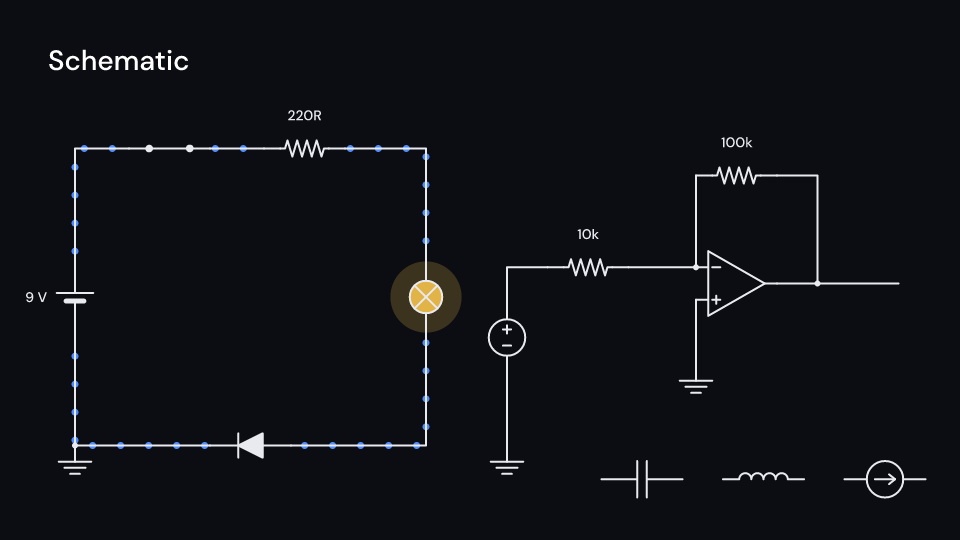
Schematic 3.5 sShow a symbol on its own, with a switch that closes after 1.5 seconds:
use fframes_kit::prelude::*;
fn symbol<'a>(ui: &mut Ui<'a, '_, '_>) -> Svgr<'a> {    ui.show(Symbol {        kind: SymbolKind::Switch { closes_at: Some(1.5) },        at: (0.0, 0.0),        size: 0.9,        label: "switch",        enter: Some(Create::default().into()),        ..ui.defaults()    })}
Schematic wires symbols together. A Connection runs from a pin to a pin, a terminal
(symbol index, name) or a point (x, y) to end on another wire, through the corners given
with via. Without corners a wire whose ends are not in line goes horizontally, then
vertically. There is no automatic routing. Junction dots mark where three or more conductors
meet. From current_at the current flows as dots along every wire (reversed with a negative
current(..), none with 0) and bulbs light up. Each wire moves its own dots, so they do not
line up across a junction. A wire with a missing terminal is skipped, and unresolved() lists
it.
use fframes_kit::prelude::*;
fn figure<'a>(ui: &mut Ui<'a, '_, '_>) -> Svgr<'a> { let theme = ui.theme.clone(); let part = |kind, at, rotation, label| Symbol { kind, at, rotation, label, ..Symbol::themed(&theme) }; ui.show(Schematic { symbols: vec![ part(SymbolKind::Battery, (-3.0, 0.0), 90.0, "9 V"), part(SymbolKind::Resistor, (0.0, 1.5), 0.0, "220R"), part(SymbolKind::Bulb, (3.0, 0.0), 90.0, ""), ], wires: vec![ Connection::new((0, "+"), (1, "a")).via([(-3.0, 1.5)]), Connection::new((1, "b"), (2, "b")).via([(3.0, 1.5)]), Connection::new((2, "a"), (0, "-")).via([(3.0, -1.5), (-3.0, -1.5)]), ], current_at: Some(1.0), ..ui.defaults() })}Components are plain structs. Set the fields you need and fill the rest with ..ui.defaults(): the defaults below come from the current theme (theme. values are fields of Theme).
Symbol
Section titled “Symbol”A circuit symbol, Manim-circuit’s Resistor, Capacitor and the rest: kind drawn at at (units of ui.space), turned rotation degrees counterclockwise, size units from its middle to a terminal. terminal gives where a wire attaches. The label is drawn beside it, on the other side with flip_label; an empty one is not drawn. The symbol draws with enter, the label and a bulb’s glow (lit, 0 to 1) fade with parts_enter. A Schematic wires symbols together.
| Field | Type | Default | Description |
|---|---|---|---|
kind |
SymbolKind |
SymbolKind::Resistor |
Which part to draw: resistor, capacitor, inductor, source, ground, op-amp, battery, switch, bulb or diode. |
at |
(f64, f64) |
(0.0, 0.0) |
The middle of the symbol, in units of ui.space. |
rotation |
f64 |
0.0 |
Degrees counterclockwise to turn the symbol around its middle. |
size |
f64 |
0.6 |
Units of ui.space from the middle to a terminal. |
label |
&str |
"" |
Text drawn beside the symbol; empty for none. |
flip_label |
bool |
false |
Puts the label on the opposite side of the symbol. |
lit |
f32 |
0.0 |
Glow of a bulb from 0 (off) to 1 (full); other symbols ignore it. |
color |
Color |
theme.colors.text |
Colour of the symbol’s lines and fills. |
label_color |
Color |
theme.colors.text |
Colour of the label. |
glow_color |
Color |
theme.colors.highlight |
Colour of a bulb’s glow. |
stroke_width |
f32 |
theme.stroke.regular |
Line width in pixels; the battery’s short plate is 2.5 times as thick. |
enter |
Option<EnterAnim> |
None |
How the symbol draws in; None shows it from the start. |
exit |
Option<ExitAnim> |
None |
How the symbol leaves at the end of the container; None stays. |
parts_enter |
Option<FadeIn> |
None |
How the label and the bulb’s glow fade in; None for none. |
parts_exit |
Option<FadeOut> |
None |
How the label and the bulb’s glow fade out before the end; None for none. |
Methods:
fn terminal(&self, name: &str) -> Option<(f64, f64)>: Where the terminalnameis, in units ofui.space;Nonefor a name the kind does not have.fn lever_angle(&self, now: f32) -> f64: The angle of a switch’s lever atnowseconds, from open (35°) to closed (0).
Feature physics · Source
Schematic
Section titled “Schematic”Symbols wired together. symbols are drawn as they are (their enter and exit aside) and wires connect their terminals at right angles through the corners each one gives; there is no automatic routing. Where three or more conductors meet (a terminal with two wires, or a wire ending on another) a junction dot is drawn with junctions.
| Field | Type | Default | Description |
|---|---|---|---|
symbols |
Vec<Symbol> |
Vec::new() |
The parts of the circuit, each placed with its own position, rotation and label. |
wires |
Vec<Connection> |
Vec::new() |
The wires between terminals or points, in order; a wire with a missing terminal is left out. |
current_at |
Option<f32> |
None |
Seconds of local time when the current starts to flow and bulbs light up; None for no current. |
current_speed |
f32 |
160.0 |
Speed of the current dots in pixels per second, before each wire’s own current factor. |
dot_spacing |
f32 |
56.0 |
Pixels between two current dots along a wire. |
junctions |
bool |
true |
Draws a dot where three or more conductors meet. |
wire_color |
Color |
theme.colors.text |
Colour of the wires and junction dots. |
dot_color |
Color |
theme.colors.accent |
Colour of the current dots. |
stroke_width |
f32 |
theme.stroke.regular |
Width of the wires in pixels. |
enter |
Option<EnterAnim> |
None |
How the wires and symbols draw in; None shows them from the start. |
exit |
Option<ExitAnim> |
None |
How the wires and symbols leave at the end of the container; None stays. |
parts_enter |
Option<FadeIn> |
None |
How the labels, current dots and glow fade in; None for none. |
parts_exit |
Option<FadeOut> |
None |
How the labels, current dots and glow fade out before the end; None for none. |
Methods:
fn pin(&self, pin: Pin) -> Option<(f64, f64)>: Wherepinis, in units ofui.space.fn route(&self, wire: &Connection) -> Option<Vec<(f64, f64)>>: The corners ofwirefrom its start to its end, in units ofui.space, orNonewhen one of its ends does not resolve.fn unresolved(&self) -> Vec<usize>: The indices of the wires with an end that names a missing symbol or terminal.fn flowing(&self, now: f32) -> f32: Seconds the current has flowed atnow, 0 before it starts or without it.fn junctions(&self) -> Vec<(f64, f64)>: The points where three or more conductors meet, in units ofui.space: the ends of wires, counting a terminal as one conductor and a wire that runs on through the point as two.
Feature physics · Source