
Pendulum and EnergyBars
Cargo featurefeatures = ["physics"]
PendulumMotion::new(length, angle0, seconds) swings a pendulum from rest without
friction; PendulumMotion::damped(length, angle0, damping, seconds) slows it. Pendulum draws it
hanging from pivot, with the reach of the swing as a dashed arc and the angle from the
vertical. EnergyBars shows kinetic energy, potential energy and their sum in pixels.
Feed it motion.energy(t, mass) at the pendulum’s clock, and one bar empties while the
other fills, with the total level (or falling, with damping). Gallery scenes: Pendulum, EnergyBars.
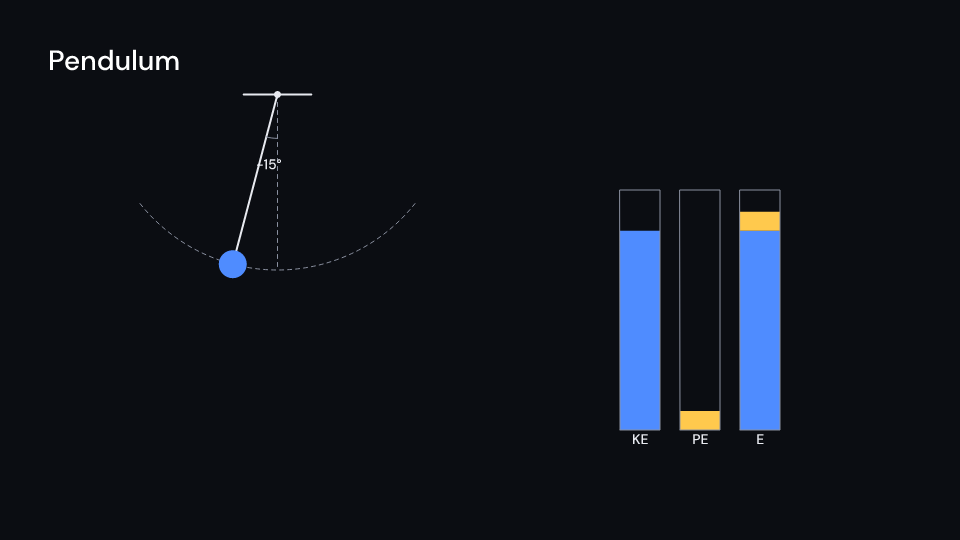
Pendulum 6 s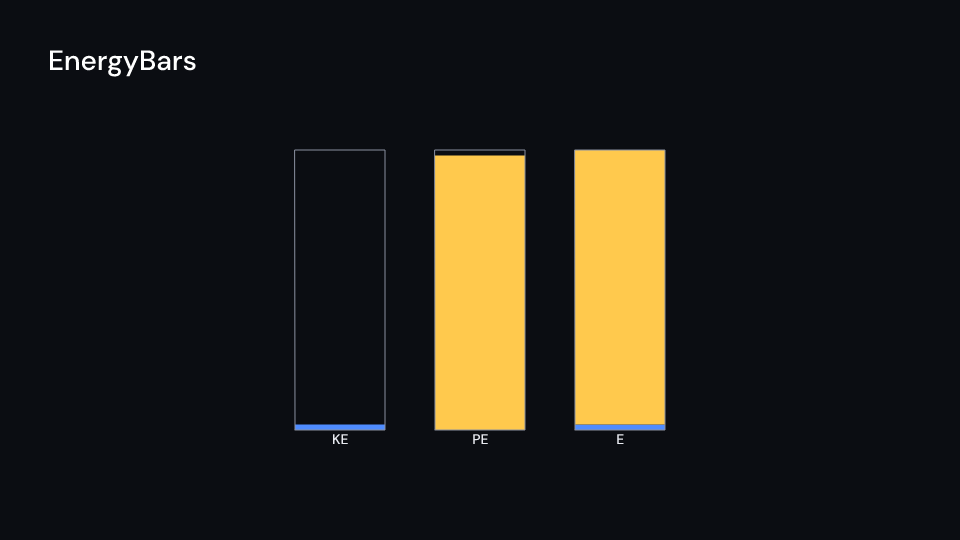
EnergyBars 6 suse std::sync::OnceLock;
use fframes_kit::prelude::*;
fn figure<'a>(ui: &mut Ui<'a, '_, '_>) -> Svgr<'a> { static MOTION: OnceLock<PendulumMotion> = OnceLock::new(); let motion = MOTION.get_or_init(|| PendulumMotion::new(2.5, 0.9, 6.0)); let delay = 0.5; let t = f64::from((ui.seconds() - delay).max(0.0)); let (kinetic, potential) = motion.energy(t, 1.0); let pendulum = ui.show(Pendulum { motion: Some(motion), pivot: (-2.5, 2.6), delay, ..ui.defaults() }); let bars = ui.show(EnergyBars { kinetic, potential, max: motion.energy(0.0, 1.0).1, ..ui.defaults() }); svgr!(<g>{pendulum}{bars}</g>)}EnergyBars also accepts values directly. This example exchanges energy between the bars
while keeping their total at one joule; positions and dimensions are in pixels.
use fframes_kit::prelude::*;
fn bars<'a>(ui: &mut Ui<'a, '_, '_>) -> Svgr<'a> { let kinetic = f64::from(ui.seconds()).sin().powi(2); ui.show(EnergyBars { kinetic, potential: 1.0 - kinetic, max: 1.0, x: 590.0, y: 860.0, bar_width: 180.0, gap: 100.0, height: 560.0, ..ui.defaults() })}Components are plain structs. Set the fields you need and fill the rest with ..ui.defaults(): the defaults below come from the current theme (theme. values are fields of Theme).
Pendulum
Section titled “Pendulum”A pendulum hanging from pivot (units of ui.space, scale units per meter) that swings as motion says, from delay seconds after the local start. With arc the swing’s reach is a dashed arc, with angle_label the angle from the vertical is written next to the pivot. The ceiling and the arc draw with enter, the rod and bob fade with parts_enter. Without motion nothing is drawn.
| Field | Type | Default | Description |
|---|---|---|---|
motion |
Option<&PendulumMotion> |
None |
The simulated swing to draw, built once in the video’s constructor; None draws nothing. |
pivot |
(f64, f64) |
(0.0, 2.5) |
Where the rod hangs from, in units of ui.space. |
scale |
f64 |
1.0 |
Units of ui.space per meter. |
delay |
f32 |
0.0 |
Seconds after the local start before the pendulum is released. |
time_scale |
f32 |
1.0 |
Speed of the motion over local time; 2 runs twice as fast, 1 is real time. |
bob_radius |
f32 |
28.0 |
Radius of the bob in pixels. |
arc |
bool |
true |
Draws the reach of the swing as a dashed arc. |
angle_label |
bool |
true |
Writes the angle from the vertical, in degrees, beside the pivot. |
color |
Color |
theme.colors.text |
Colour of the rod, the pivot, the ceiling and the angle label. |
bob_color |
Color |
theme.colors.accent |
Colour of the bob. |
guide_color |
Color |
theme.colors.muted |
Colour of the dashed arc, the rest line and the angle arc. |
stroke_width |
f32 |
theme.stroke.regular |
Width of the rod and the ceiling in pixels. |
enter |
Option<EnterAnim> |
None |
How the ceiling and the arc draw in; None shows them from the start. |
exit |
Option<ExitAnim> |
None |
How the ceiling and the arc leave at the end of the container; None stays. |
parts_enter |
Option<FadeIn> |
None |
How the rod and bob fade in; None for none. |
parts_exit |
Option<FadeOut> |
None |
How the rod and bob fade out before the end; None for none. |
Feature physics · Source
EnergyBars
Section titled “EnergyBars”Bars of kinetic energy, potential energy and their sum, standing on (x, y) (pixels, the bottom left corner) and height pixels tall at max joules. Give them the values of the current frame, for example from PendulumMotion::energy at the same clock as the figure, and the exchange shows as one bar shrinking while the other grows with the total level. The frames draw with enter, the bars and labels fade with parts_enter.
| Field | Type | Default | Description |
|---|---|---|---|
kinetic |
f64 |
0.0 |
Kinetic energy in joules shown by the first bar. |
potential |
f64 |
0.0 |
Potential energy in joules shown by the second bar. |
max |
f64 |
1.0 |
Joules at which a bar is height pixels tall; larger values are clamped. |
x |
f32 |
1400.0 |
Left edge of the first bar, in pixels of the canvas. |
y |
f32 |
820.0 |
Bottom edge of the bars (their baseline), in pixels of the canvas. |
bar_width |
f32 |
80.0 |
Width of each bar in pixels. |
gap |
f32 |
40.0 |
Pixels between one bar and the next. |
height |
f32 |
420.0 |
Height in pixels of a full bar and its frame. |
labels |
bool |
true |
Writes KE, PE and E at the foot of the three bars. |
kinetic_color |
Color |
theme.colors.accent |
Colour of the kinetic bar and its share of the total. |
potential_color |
Color |
theme.colors.highlight |
Colour of the potential bar and its share of the total. |
total_color |
Color |
theme.colors.text |
Colour of the labels. |
frame_color |
Color |
theme.colors.muted |
Colour of the outline frames of the bars. |
enter |
Option<EnterAnim> |
None |
How the frames draw in; None shows them from the start. |
exit |
Option<ExitAnim> |
None |
How the frames leave at the end of the container; None stays. |
parts_enter |
Option<FadeIn> |
None |
How the bars and labels fade in; None for none. |
parts_exit |
Option<FadeOut> |
None |
How the bars and labels fade out before the end; None for none. |
Feature physics · Source