
RayDiagram and Refraction
Cargo featurefeatures = ["physics"]
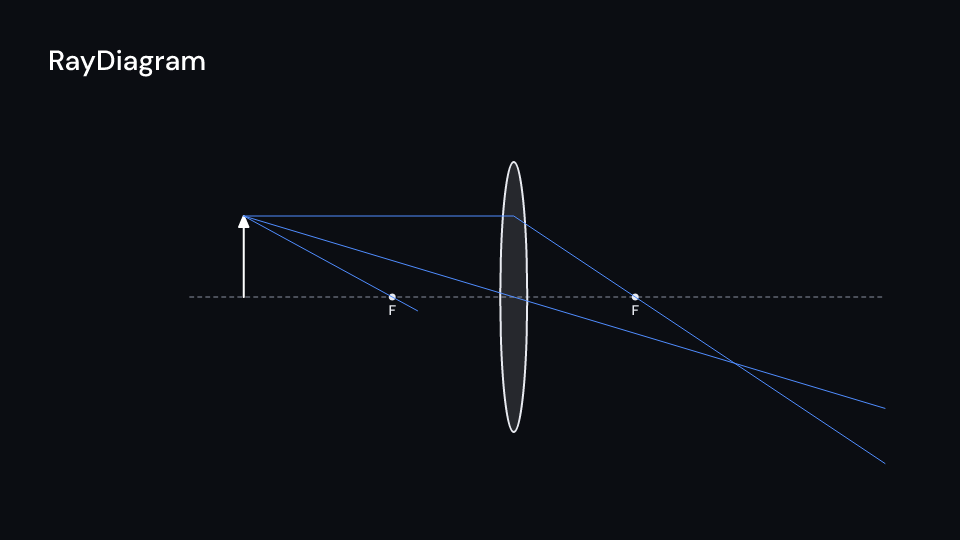
RayDiagram draws the three principal rays of a thin lens (Optic::Lens) or a mirror
(Optic::Mirror). A positive focal is a converging lens or a concave mirror, a negative
one a diverging lens or a convex mirror. The rays leave the tip of an object
object_distance units in front, one after another. Then the image forms where they meet,
dashed with the rays’ backward extensions when it is virtual. image_distance,
magnification and image give the numbers from 1/d_o + 1/d_i = 1/f. Gallery scenes:
RayDiagram (a lens) and Mirror.
RayDiagram 4.5 s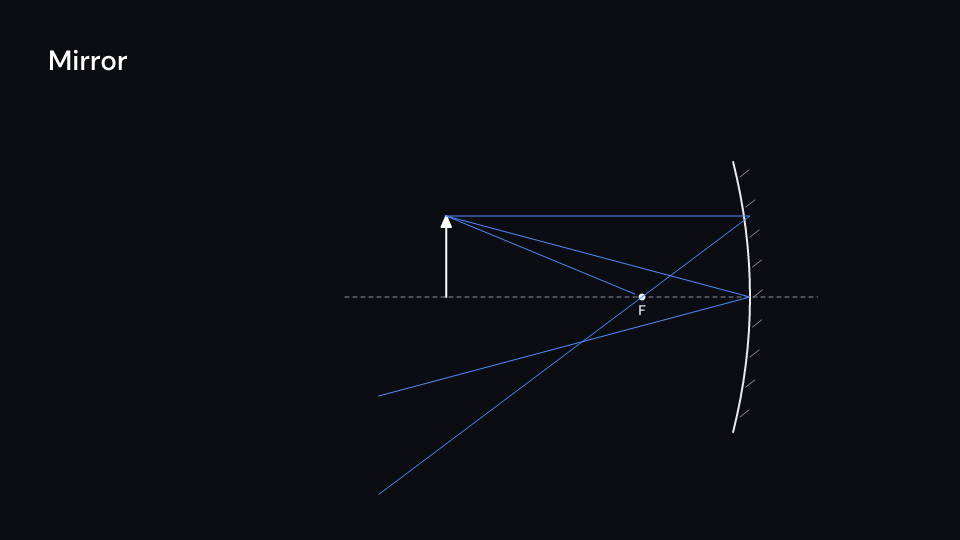
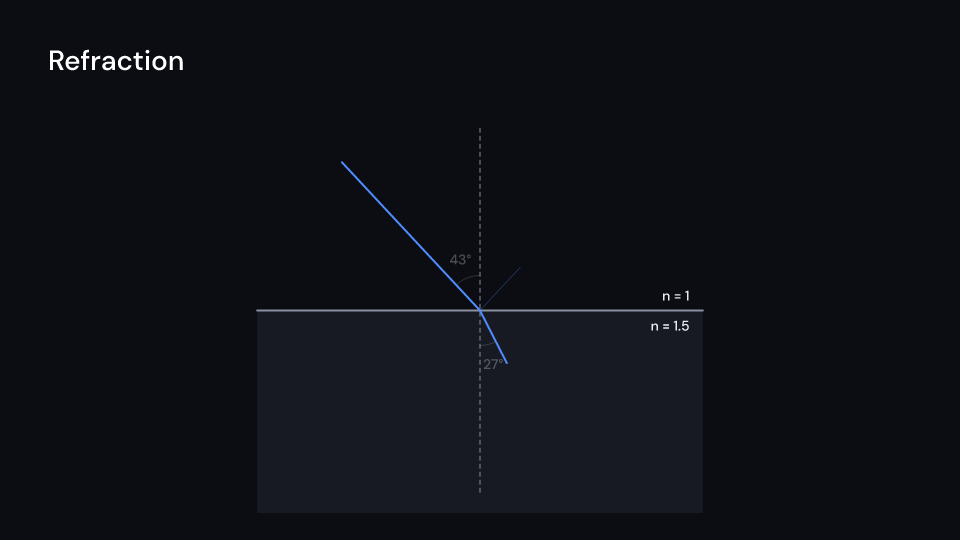
Mirror 4.5 sRefraction bends a ray at the boundary between two media by Snell’s law, with the weak
reflection and the angles. Past the critical angle (critical_angle()) the ray is
reflected whole. Gallery scene: Refraction.
Refraction 3.5 suse fframes_kit::prelude::*;
fn figures<'a>(ui: &mut Ui<'a, '_, '_>) -> Svgr<'a> { let lens = ui.show(RayDiagram { center: (0.5, 1.5), focal: 1.8, object_distance: 4.0, object_height: 1.0, optic_height: 2.5, delay: 0.5, ..ui.defaults() }); let glass = ui.show(Refraction { point: (0.0, -2.0), n1: 1.0, n2: 1.5, angle: 0.75, length: 1.8, ..ui.defaults() }); svgr!(<g>{lens}{glass}</g>)}Components are plain structs. Set the fields you need and fill the rest with ..ui.defaults(): the defaults below come from the current theme (theme. values are fields of Theme).
RayDiagram
Section titled “RayDiagram”The principal rays of a thin lens or a mirror at center (units of ui.space) on a horizontal axis, from the tip of an object arrow object_distance units to its left and object_height tall: parallel to the axis then through the focal point, through the middle, and through the focal point then parallel. They draw on one after another from delay seconds after the local start (ray_time each, stagger apart) and run reach units past the optic; then the image forms where they meet, dashed with the rays’ backward extensions when it is virtual. Lengths are units of ui.space (focal is the focal length). The axis, optic, focal points and object draw with enter, the rays and the image and the labels with parts_enter.
| Field | Type | Default | Description |
|---|---|---|---|
optic |
Optic |
Optic::Lens |
Whether the element is a thin lens or a spherical mirror. |
center |
(f64, f64) |
(0.0, 0.0) |
The middle of the optic, where the axis crosses it, in units of ui.space. |
focal |
f64 |
1.8 |
Focal length in units of ui.space; negative for a diverging lens or a convex mirror. |
object_distance |
f64 |
4.0 |
Distance of the object from the optic, to its left, in units of ui.space. |
object_height |
f64 |
1.2 |
Height of the object arrow in units of ui.space. |
reach |
f64 |
6.0 |
How far the rays run past the optic, in units of ui.space. |
optic_height |
f64 |
4.0 |
Height of the drawn lens or mirror in units of ui.space. |
delay |
f32 |
0.0 |
Seconds after the local start before the first ray begins to draw. |
ray_time |
f32 |
0.8 |
Seconds each ray takes to draw. |
stagger |
f32 |
0.6 |
Seconds between the start of one ray and the next. |
labels |
bool |
true |
Writes F under the focal points. |
optic_color |
Color |
theme.colors.text |
Colour of the optic, the focal points and their labels. |
object_color |
Color |
theme.colors.title |
Colour of the object arrow. |
image_color |
Color |
theme.colors.highlight |
Colour of the image arrow. |
ray_color |
Color |
theme.colors.accent |
Colour of the rays. |
guide_color |
Color |
theme.colors.muted |
Colour of the dashed axis and the mirror’s hatching. |
stroke_width |
f32 |
theme.stroke.regular |
Width of the optic and the object and image arrows in pixels; rays use the theme’s thin width. |
enter |
Option<EnterAnim> |
None |
How the axis, optic, focal points and object draw in; None shows them from the start. |
exit |
Option<ExitAnim> |
None |
How those parts leave at the end of the container; None stays. |
parts_enter |
Option<FadeIn> |
None |
How the rays, image and labels fade in; None for none. |
parts_exit |
Option<FadeOut> |
None |
How the rays, image and labels fade out before the end; None for none. |
Methods:
fn image_distance(&self) -> Option<f64>: The image distance from1/d_o + 1/d_i = 1/f: positive for a real image (right of a lens, left of a mirror), negative for a virtual one,Nonewhen the object is at the focal point and the rays leave parallel.fn magnification(&self) -> Option<f64>: The image’s height over the object’s,-d_i / d_o; negative when it is upside down.fn image(&self) -> Option<(f64, f64)>: The image’s tip, in units from the optic,yup.
Feature physics · Source
Refraction
Section titled “Refraction”A ray meeting the flat boundary between two media at point (units of ui.space): it comes in from the upper left at angle radians from the normal through the upper medium (index n1) and bends into the lower one (n2) by Snell’s law, n1 sin θ1 = n2 sin θ2. Past the critical angle it is reflected whole instead. With reflection the weak reflected ray is drawn as well. The rays draw on from delay seconds after the local start, the incoming one over ray_time seconds and then the others; with labels the angles and indices are written. Rays are length units long. The boundary, the normal and the media draw with enter, the rays and labels with parts_enter.
| Field | Type | Default | Description |
|---|---|---|---|
point |
(f64, f64) |
(0.0, 0.0) |
Where the ray meets the boundary, in units of ui.space. |
n1 |
f64 |
1.0 |
Refractive index of the upper medium, where the ray comes from. |
n2 |
f64 |
1.5 |
Refractive index of the lower medium; the ray bends toward the normal when it is higher. |
angle |
f64 |
0.7 |
Angle of incidence in radians from the normal; past the critical angle the ray is reflected whole. |
length |
f64 |
3.0 |
Length of the rays in units of ui.space; the lower medium is that deep. |
reflection |
bool |
true |
Draws the weak reflected ray as well, when the ray is refracted. |
labels |
bool |
true |
Writes the angles and the indices of the two media. |
delay |
f32 |
0.0 |
Seconds after the local start before the incoming ray begins to draw. |
ray_time |
f32 |
0.8 |
Seconds each ray takes to draw; the outgoing rays start when the incoming one is done. |
ray_color |
Color |
theme.colors.accent |
Colour of the rays. |
medium_color |
Color |
theme.colors.surface |
Colour of the lower medium. |
guide_color |
Color |
theme.colors.muted |
Colour of the boundary, the dashed normal and the angle arcs. |
text_color |
Color |
theme.colors.text |
Colour of the index and angle labels. |
stroke_width |
f32 |
theme.stroke.regular |
Width of the incoming and outgoing rays and the boundary in pixels. |
enter |
Option<EnterAnim> |
None |
How the boundary, normal and media draw in; None shows them from the start. |
exit |
Option<ExitAnim> |
None |
How the boundary, normal and media leave at the end of the container; None stays. |
parts_enter |
Option<FadeIn> |
None |
How the rays, angles and labels fade in; None for none. |
parts_exit |
Option<FadeOut> |
None |
How the rays, angles and labels fade out before the end; None for none. |
Methods:
fn refraction_angle(&self) -> Option<f64>: The angle of the refracted ray from the normal, orNonepast the critical angle.fn critical_angle(&self) -> Option<f64>: The angle of incidence past which the ray is reflected whole; only whenn1 > n2.
Feature physics · Source